

Dahua Setup
Dahua cameras have three streams instead of the usual two, which allows for better quality analytics without affecting your recording or live view streams.
| Stream | Purpose |
|---|---|
| Main Stream | Recording (high quality) |
| Sub Stream 1 | Live view (medium quality) |
| Sub Stream 2 | Analytics (720p, low CPU) |
On the Camera
Main Stream (Recording)
Set the primary stream to H.264 for maximum compatibility. See H.264 vs H.265 for codec considerations.
Sub Stream 2 (Analytics)
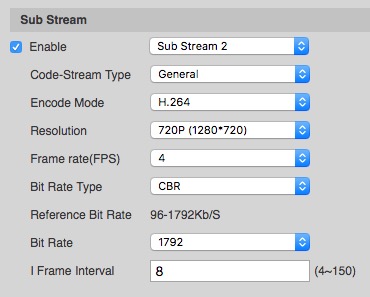
- Enable Sub Stream 2 and select it from the dropdown
- Configure as follows:
| Setting | Value |
|---|---|
| Encode Mode | H.264 Baseline (preferred) or H.264 Main |
| Resolution | 720p |
| Frame Rate | 4-6 fps |
| Bit Rate Type | VBR |
| Bit Rate | 1024 Kb/s |
| I Frame Interval | Double the framerate (8 or 12) |
Important: Make sure you select Sub Stream 2 in the dropdown as shown above.
Tip: Code-Stream Type is missing on some models - this option is not important.
Note: If Sub Stream 2 is not available on your model, Sub Stream 1 will work but typically has lower resolution - in this case skip the TetherX configuration below.
In TetherX
To use Sub Stream 2 for analytics, you need to configure a custom Analytics URL:
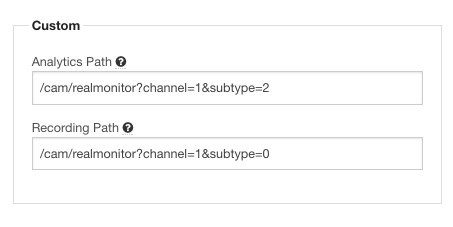
- Go to Admin → Cameras and select your camera
- Open the Advanced tab
- Under Analytics URL, enter:
/cam/realmonitor?channel=1&subtype=2
Referenced in:
Last updated: January 30, 2026