

Table of Contents
Matrix Displays
TetherX supports LED matrix displays for ANPR applications, showing detected licence plates in real-time.
Compatibility
TetherX supports two families of display controller:
- SDHX, HX & HXE Sign Protocol, over serial or TCP/IP. Choose Spectra Displays as the display type.
- C-Power controllers, over TCP/IP on port 5200. This covers the C-Power 1200, 2200, 3200, 5200 and 3A boards, which are the signs supplied with the LED Screen Connect (LedCenterM) Windows software. Choose C-Power (LED Screen Connect) as the display type.
The main difference between compatible displays is the physical size and how many characters can be displayed at one time. While displays usually support both serial and Ethernet connections, we recommend TCP/IP for maximum stability.
Tip: A popular choice for ANPR matrix displays is Spectra Displays (opens in a new tab). Buy either the HX/HXE version or a C-Power version, and select the matching display type in TetherX. The two speak different protocols, and a display set to the wrong type shows nothing at all.
Warning: Some manufacturers offer versions of the same display with and without HX/HXE protocol support. Check which controller a sign carries before purchasing, and ask the supplier if the listing does not say.
Setting Up in TetherX
Step 1: Enable on the Camera
- Go to Admin → Cameras and select your ANPR camera
- In the Details tab, find ANPR LED Matrix Display
- Toggle it on
Step 2: Configure the TetherBox
- Go to Admin → TetherBoxes and select the TetherBox connected to your matrix display
- Open the Settings tab
- Scroll to and expand the Matrix Display section
- Toggle Show ANPR on Display on
- Configure the connection settings:
- Display Type - Spectra Displays for an HX/HXE sign, or C-Power (LED Screen Connect) for a C-Power controller
- Connection Type - TCP for Ethernet or Serial for RS232. C-Power controllers are TCP only
- Display IP - The matrix display's IP address (TCP only)
- Display IP Port - 10001 for an HX/HXE sign, 5200 for a C-Power controller (TCP only)
- TTY Port / Port Speed - Serial port settings (Serial only)
- Display Camera - Select which ANPR camera's plates to display
- Message Delay - How long to show each plate in seconds (default: 10)
- Default Message - Text shown when no plate is detected (e.g., "ANPR IN USE")
- After Message - Text shown after plate display (e.g., "IMAGES RECORDED")
Step 3: C-Power Panels Only - Set the Panel Size
A C-Power controller places text inside the panel size the TetherBox gives it, so it needs the panel's real dimensions in pixels. A size meant for a wider panel pushes the plate off the end of the one on the wall.
- Display Width and Display Height - The panel's size in pixels (default: 96 x 32)
- Display Colour - red, green, yellow, blue, purple, cyan or white. A single-colour panel shows every choice in the colour it has
- Display Effect - How each message arrives: draw (appear in place), from_left, from_right, move_left, move_right, scroll_left, scroll_right or flicker
The controller does not report its own size, so take it from one of these:
- The screen setup in the LED Screen Connect software that came with the sign
- The sign's datasheet
- Counting the LED modules behind the panel and multiplying: a P10 module is 32 x 16 pixels, so three across and two down is 96 x 32
Click Test Display to verify the connection - a test message will be sent to the display. A C-Power controller acknowledges each message, so a failure here means the sign did not take it. An HX/HXE sign acknowledges nothing, so a success there means the TetherBox sent the message and you should check the panel itself.
The matrix display will show detected licence plates for the configured duration, then switch back to the default message.
Example Installation
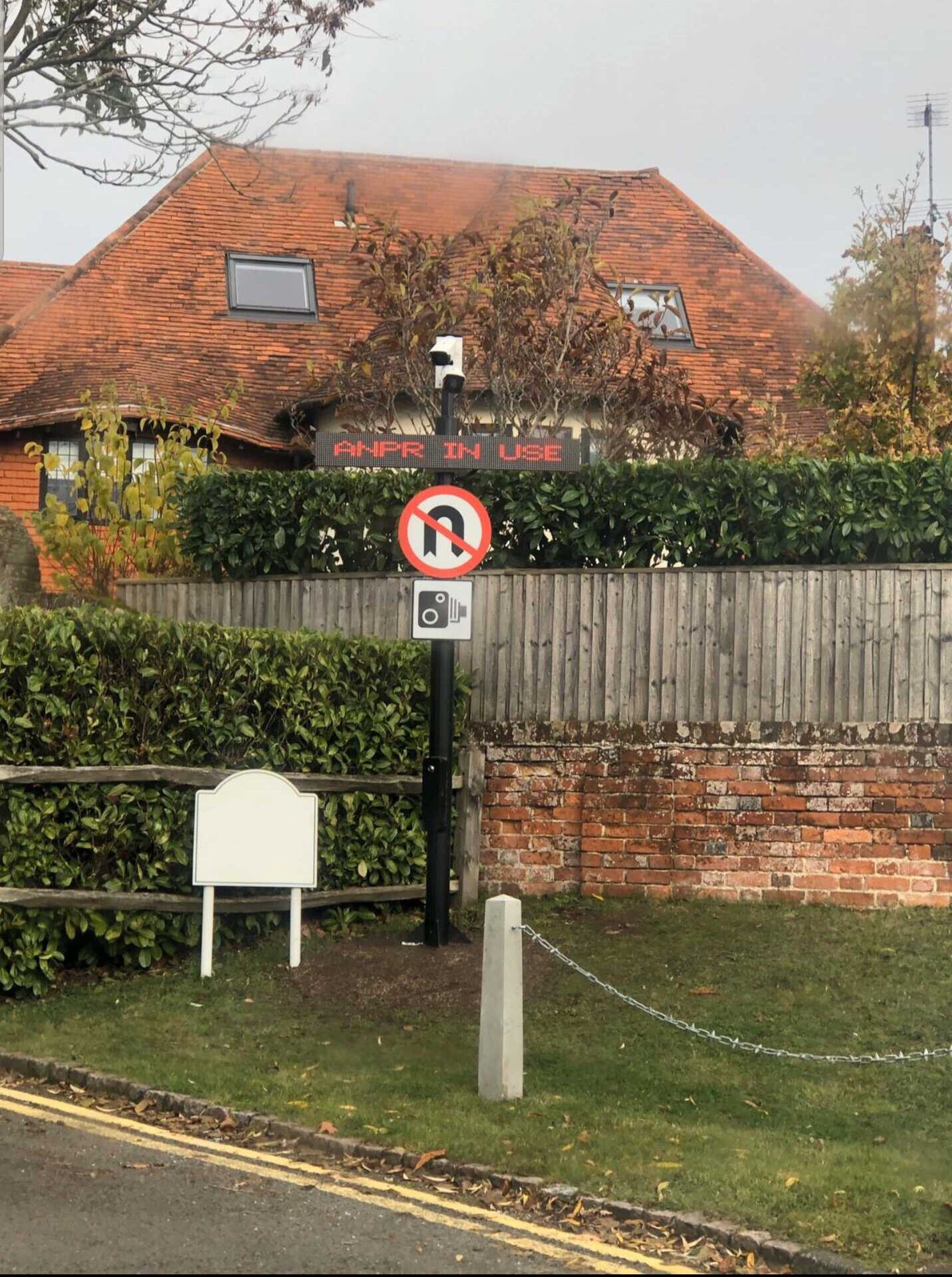
A typical ANPR installation is configured to:
- Show "ANPR IN USE" as the default message
- When a licence plate is detected, display the plate for 20 seconds (or until the next vehicle arrives)
- Show "IMAGES RECORDED" before returning to the default message
Limitations
- Only one matrix display can be connected per TetherBox
- Only the SDHX, HX & HXE Sign Protocol and C-Power controllers are supported
- A C-Power controller cannot be asked for its panel size, its colour depth or what it is currently showing. Set the size yourself from the sources above
Tip: Need a different protocol or additional features? Let us know - we regularly add support for new display types.
Referenced in: