

Table of Contents
Top ARC Improvements
Major enhancements designed for Alarm Receiving Centres (ARCs) and remote monitoring stations.
1. Monitoring Strip
When operators soft-close an event with ongoing activity, it moves to a Monitoring Strip on the right - allowing a final glance before full closure. Events are sorted oldest-first so those closest to expiring appear at the top.
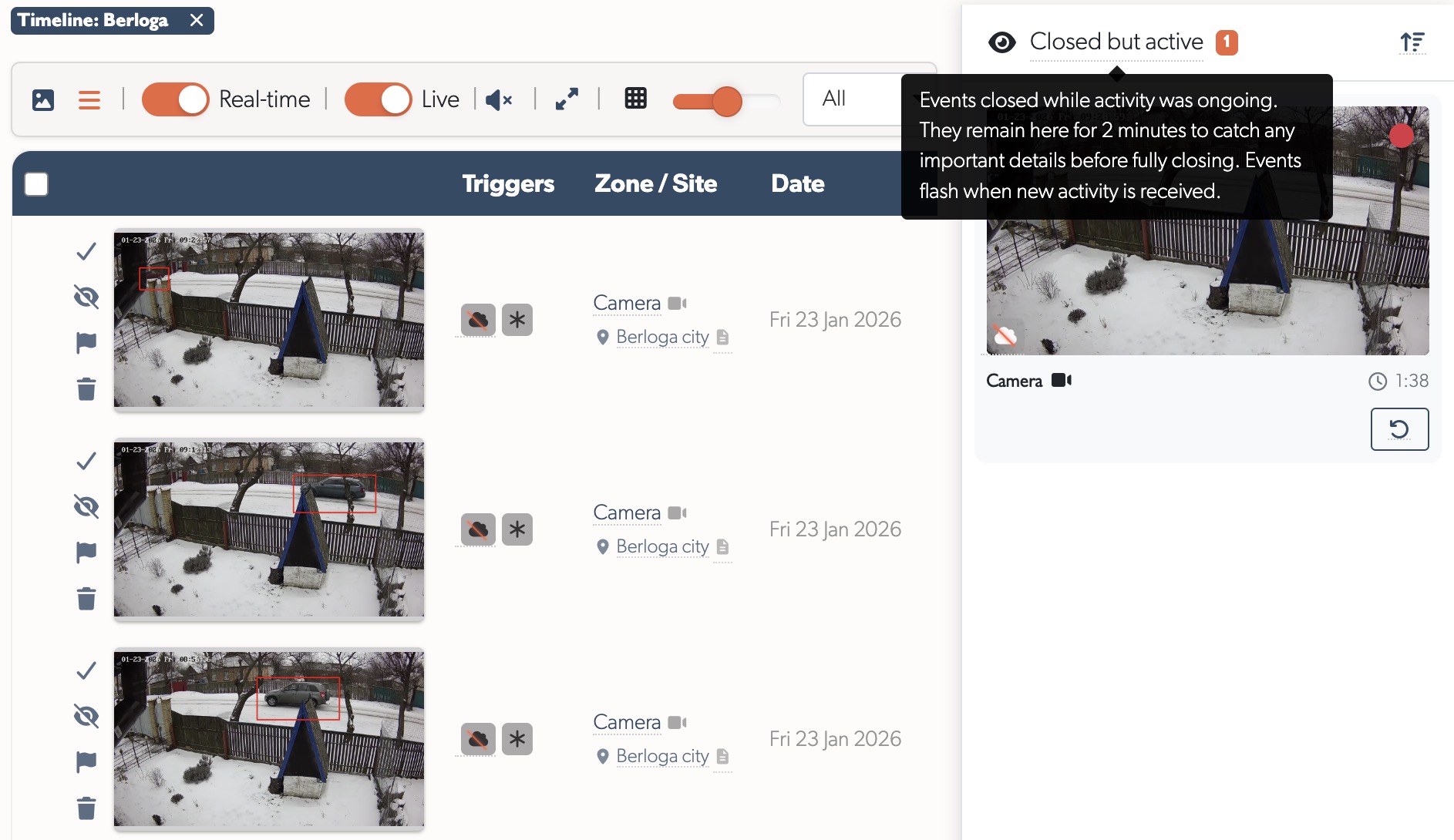
- Configurable countdown (default 5 minutes) with red pulse warning in final 30 seconds
- Activity alerts flash when new analytics detected
- One-click reopen to bring events back for review
Tip: Sites that previously showed thousands of events now show hundreds - a single event covers what would have generated multiple separate events.
See Monitoring Station Operator Guide for the complete workflow.
2. ARC Performance Reports
Daily pre-aggregated reports showing event handling, operator performance, and camera activity.
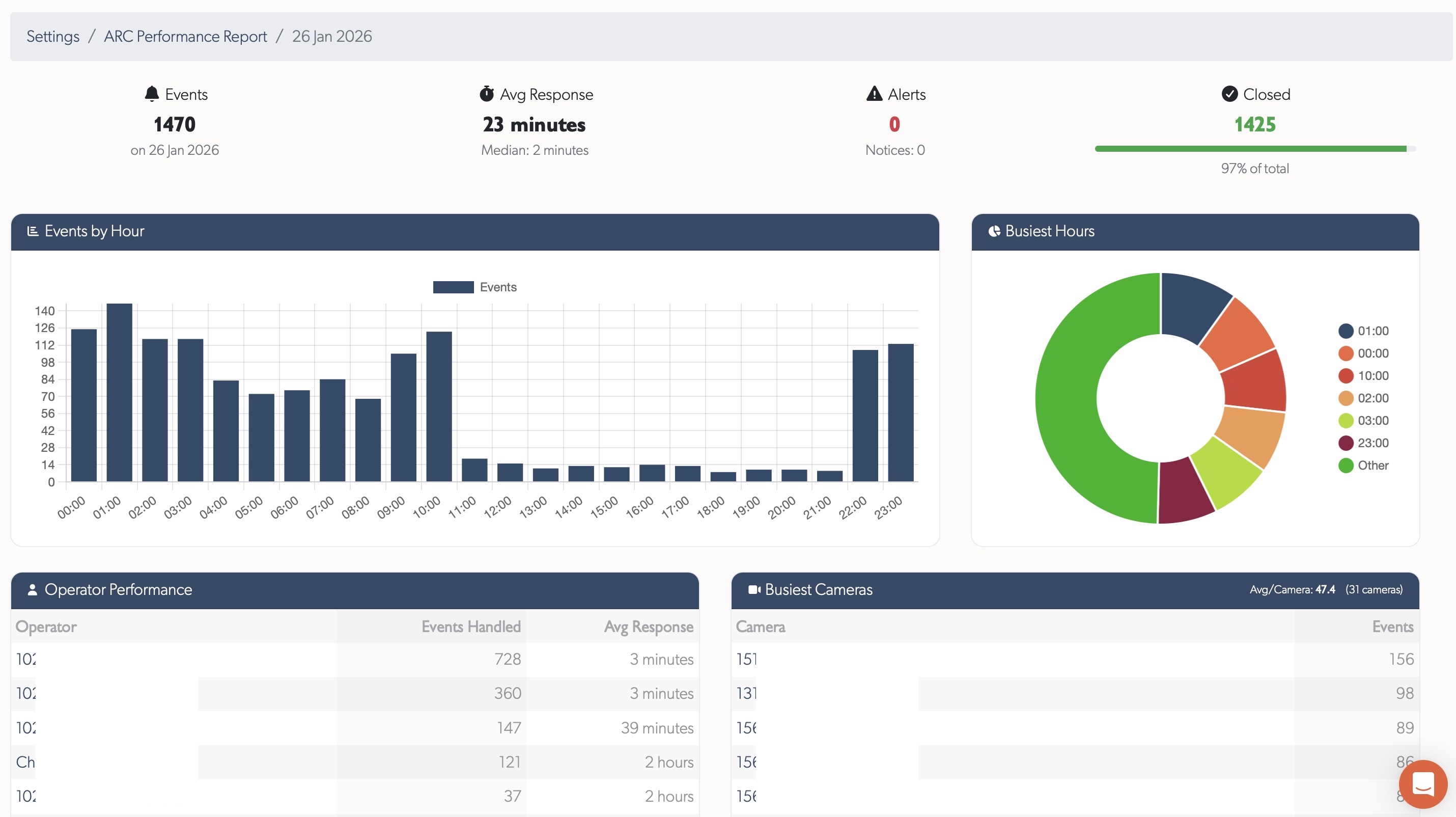
- Trends - Events per day and response times over 60 days
- KPIs - Total events, average response time, alerts, closed percentage, events per camera
- Operator tables - Events handled and response times per operator
- Busiest cameras - Direct links to zones for investigation
See ARC Performance Reports for full documentation.
3. Operator Workflows
Purpose-built event processing with real-time updates:
| State | Description |
|---|---|
| Open | New events requiring attention |
| Pending | Currently being viewed - prevents duplicate work |
| Closed | Reviewed and closed |
| Hidden | Recording in background, not shown in lists |
- Real-time updates - events appear instantly without refreshing
- Bulk selection for closing or hiding multiple events
- Bulk editing to close, open, flag, or select large batches of events across time periods and filters - enabled per operator via the Allow Bulk Event Actions permission
- Instant live preview - hover thumbnails to see enlarged live feed
Tip: Use List View for monitoring - it shows more events on screen and enables sequential processing.
Tip: Bulk editing on more than 15 events is gated by the per-operator Allow Bulk Event Actions permission - enable it under the operator's user permissions to grant access.
4. ARC Troubleshooting
Two tools for diagnosing monitoring station issues:
ARC Performance Report Form - Submit slowdown reports with time window, timezone, affected sites, speed test results, and workstation specs.
ARC Slowdown Diagnostics - TetherX support analyses rate limiting, server errors, TetherBox updates, VPN connectivity, and request patterns. Issues that previously took hours to diagnose now take seconds.
Tip: When reporting issues, provide a 5-10 minute time window in your local timezone for fastest diagnosis.
5. Operator Guide
Comprehensive documentation covering event processing, monitoring strip workflow, live preview, site notes, and reporting issues.
See Monitoring Station Operator Guide for the complete guide.
Related
- Monitoring Station Operator Guide - Complete operator workflow documentation
- ARC Performance Reports - Daily metrics and reporting
- Events View Menu - Filtering, grouping, and display options
Referenced in: