

Table of Contents
Manitou Integration
TetherX reports alarms to a Bold Group Manitou control room as SIA DC-09 messages, sent straight to their alarm receiver. The receiver acknowledges every message it accepts, so an alarm is either acknowledged or reported to us as a failure.
DC-09 is an industry standard rather than one company's API, so the same settings reach any DC-09 receiver. If your control room runs MASterMind, Patriot, Immix or anything else behind a hardware IP receiver, this integration reaches it too. Manitou is simply the one whose receiver documentation is public, so it is the one we built and tested against.
This is also the path for a control room that used to run SIMS. Bold Group ended support for SIMS and Phoenix on 31 March 2026 and migrated those customers to Manitou.
For a control room that wants pictures with each alarm, see Immix Integration. For HikCentral, see HikCentral Integration. For Patriot's own API, which acknowledges each alarm as it records it and can carry a verification image, see Patriot Systems Integration.
Setting Up a Site
Your control room sets their receiver up first and gives you the address, the port and the account number they have issued for this site. Once you have those:
Open the site you want to configure, then select the Manitou tab
Switch Enable Integration on and enter the details your control room provides
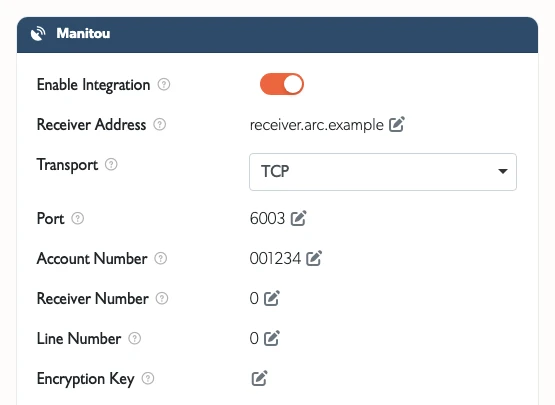
- Receiver Address: the hostname or IP of their alarm receiver
- Transport: TCP unless they ask for UDP. TCP is the default and the better choice, because a UDP message that does not arrive cannot be told apart from one nobody sent
- Port: leave this empty to use the standard port, which is 6003 for TCP and 6002 for UDP. Fill it in only if your control room uses a different one
- Account Number: the account they have issued for this site. This is what identifies the site on their system
- Receiver Number and Line Number: leave both at 0 unless your control room gives you numbers to present as
- Encryption Key: see Encrypted routes below

Each field saves as you finish editing it, so there is no Save button to press.
The integration cannot be switched on until the receiver address and the account number are filled in, because a message carrying neither can reach nobody.
What the control room receives
Each alarm is one DC-09 message carrying:
| Part | What it carries |
|---|---|
| Event code | A two-letter SIA code: FA fire, WA flood, GA gas, PA panic, HA duress, BA burglary, TA tamper, CL and OP for arming and disarming |
| Zone number | The camera number, which is what your control room writes response instructions against. Numbers start at 1 within a site and never change once a camera has them. A site-wide alarm, such as a TetherBox going offline, reports as zone 0 |
| Alarm text | The TetherX event name in full, the camera and the site |
| Verification link | A link straight to the event in TetherX, for the operator to click while handling the alarm |
| Timestamp | When the detection happened, in GMT. Not when the message was sent |
[!NOTE] SIA has no event code for what a camera sees. A lorry, a person, a missing hard hat and a queue are all
UA, which is the standard's Untyped Zone Alarm, and the alarm text is where they are told apart. We would rather send an untyped alarm with an accurate description than a specific code that means something else.
DC-09 carries no pictures. An operator sees the alarm, the camera number, the description and the link, but not the frames. A site whose operators must see the pictures reports to an email control room as well, which is a second integration on the same page.
Encrypted routes
A control room can set an encryption key on a receiver route, and every message on that route must then use it.
[!WARNING] TetherX cannot encrypt DC-09 messages yet. Ask your control room for an unencrypted route. If a key is recorded on the site, alarms are held rather than sent, and reported to us, because a receiver discards a message it cannot decrypt without answering at all, which would look exactly like a control room that is switched off.
Testing it
Ask your control room to watch for a test signal, then use the site's own test tools, or wait for a real detection. Every message is acknowledged or reported as a failure, so if nothing arrives at their end and nothing is reported at ours, check the address and the port first.
If an alarm cannot be delivered, TetherX retries it and then reports the failure, naming what the receiver said. Three answers are worth knowing:
- Nothing at all. The receiver is not listening, or it discarded the message. DC-09 makes silence the receiver's answer to a message it could not read, so this is never counted as delivered.
- A rejected timestamp. The receiver checks our clock against its own and says what time it has. This is usually a clock problem at one end, not a configuration problem.
- Unable to process. The receiver read the message and could not act on it, which is a configuration question for the control room. No retry fixes it, so it is reported rather than tried again.
Related Articles
- Control Room Software Integration - How the platforms compare and what each gives you
- Immix Integration - Alarms by email, with the verification frames attached
- HikCentral Integration - Generic events sent straight to HikCentral Professional
- Patriot Systems Integration - Direct integration with Patriot
- Definitions - Event types and terminology
Referenced in: