

Table of Contents
2026 Highlights
Cloud Quotes and Regional Pricing
Build a cloud quote by choosing activity level, retention and quality, with optional time-lapse and number plate storage. The summary shows the package code, partner discount and customer price. Canadian, Australian and Indian domains display local currencies. Manual subscription cancellations send an email with the scheduled end date and a link to review the plan.
Cameras & Devices
From plugged in to recording, without manufacturer software or per-camera logins.
Mobile Live View
Live View now treats a phone or tablet camera tile as a direct picture control: tap to show or hide the controls, pinch to zoom and drag a zoomed image or video. A double tap moves cleanly into fullscreen or back to the wall, with the last camera frame retained while the wall resumes. Saved walls also retain a deliberate zoom and pan, without turning automatic fit or fill into a saved setting.
Camera Onboarding & Reconfiguration
Bring any camera to its best settings - whether it was installed today or years ago, on DHCP or a static IP.
Automatic Configuration. TetherBoxes apply recommended stream settings (bitrate, codec, profile, framerate, resolution) to any compatible camera, new or already commissioned, turning hours of per-camera setup into nothing. No opening each camera's IP one by one, no learning a different manufacturer's software per brand. Requires native camera APIs (Hikvision, Merit-LILIN, Homaxi and many others) or ONVIF. Visual indicators flag issues with clear explanations, and a "Disable Defaults" toggle keeps manual control where needed.
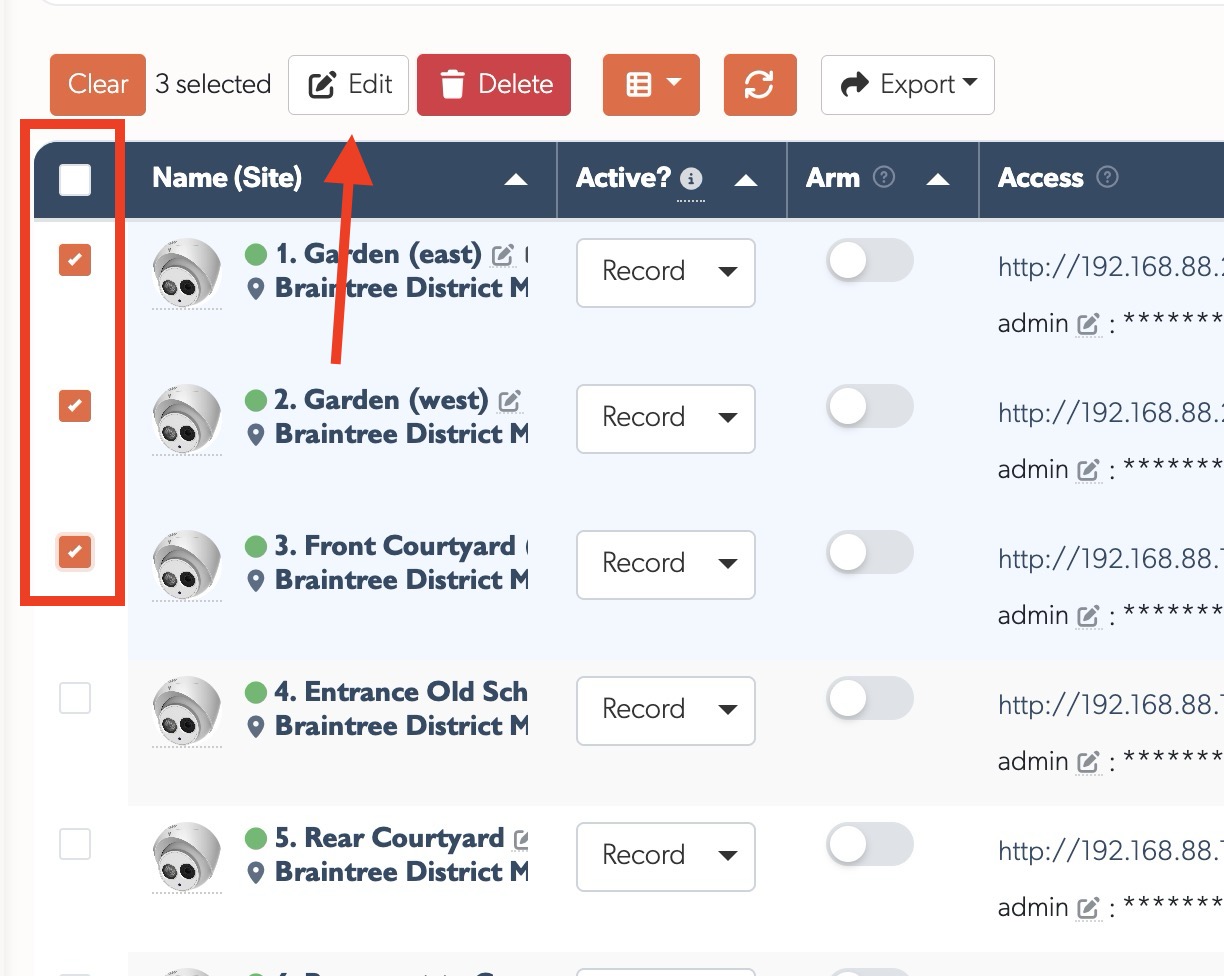
Bulk changes. Select multiple cameras with checkboxes (including select all), then apply settings - active mode, credentials, recording mode, schedule, notifications, cloud - across an entire site in one operation, or delete them together. Site-wide configuration changes that were once camera-by-camera now take a few clicks.
Activation. Brand-new, unconfigured cameras and recorders can be activated straight from the cloud. Devices flagged as requiring activation show an Activate button next to their IP on the Devices page; a single click sets a secure password and sensible defaults.
Static IP assignment. A new Network section on the camera API tab handles addressing for sites that want it. Auto-Assign moves a camera onto the next free address on the private 192.168.88.x network in one click, isolating it from the customer LAN so it is only reachable via the TetherBox; IP, netmask, gateway and DNS can also be set manually. DHCP cameras work fine without this step. See Camera API Tab.
Professional Monitoring
Built for Alarm Receiving Centres and remote monitoring stations.
Monitoring Strip for ARCs
A new workflow designed for Alarm Receiving Centres (ARCs) and remote monitoring stations. When operators close an event that still has active analytics or motion, instead of disappearing immediately, the event moves to a Monitoring Strip on the right side of the screen - alerting operators to ongoing activity and allowing them to reopen with one click. See the Monitoring Station Operator Guide for the complete workflow.
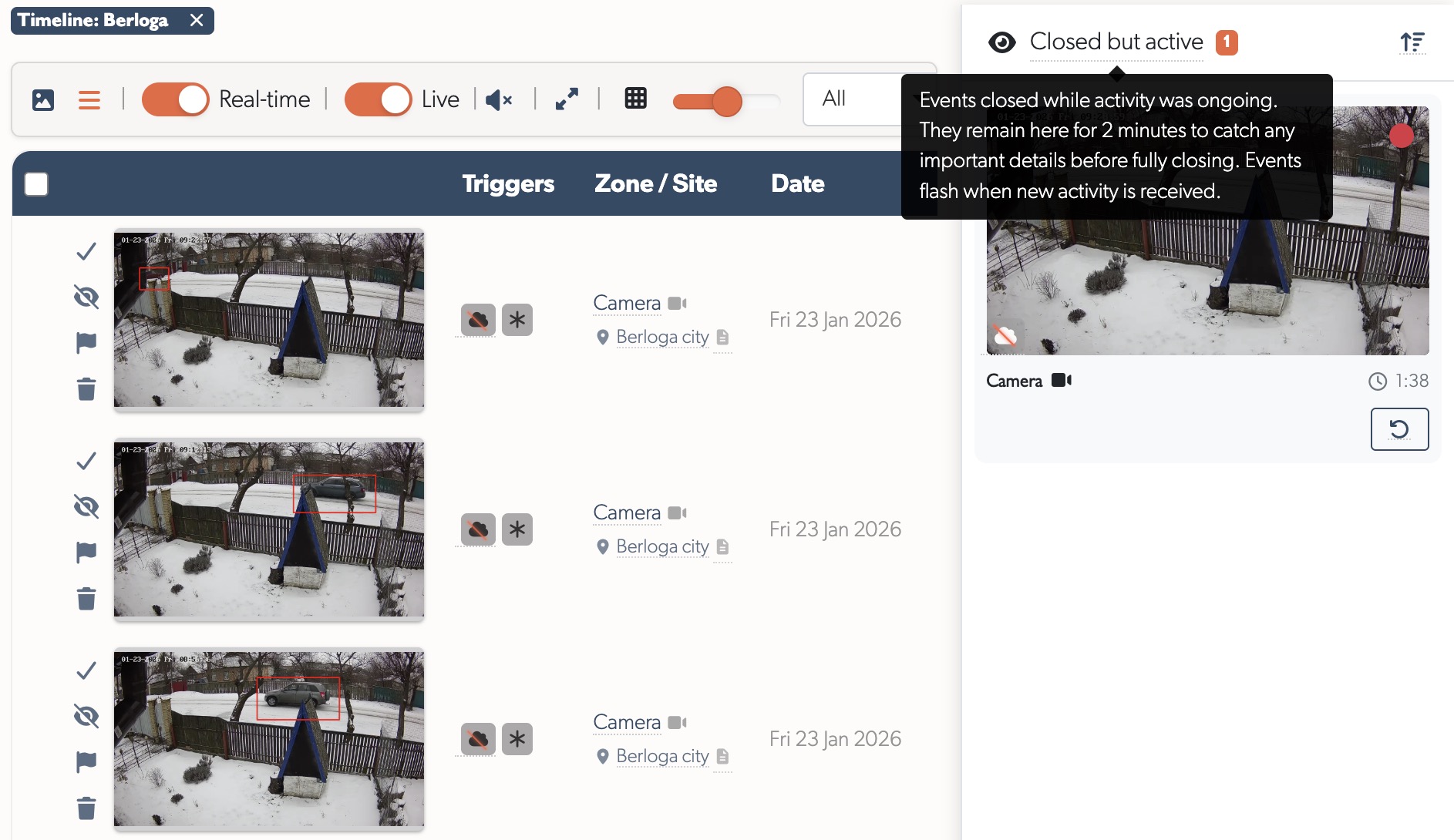
Dramatically fewer events: By keeping events open while activity continues, a single event covers what would previously have generated multiple separate events - sites that showed thousands of events now show hundreds.
Tip: If you'd like your TetherBox professionally monitored by an Alarm Receiving Centre, or want to add police response to your site, contact TetherX Support to discuss options.
Monitoring Station Operator Console
A focused, full-screen console built for monitoring-station and ARC operators. Each event opens with a toolbar to set it pending, release it back to the queue, mark that action was taken, close and jump straight to the next event, or call a supervisor. A new Operator user type sees only the events for the zones it is assigned, with the event list tuned for sit-and-watch use, and any operator can be marked a Supervisor to receive escalation calls. See the Monitoring Station Operator Guide for the full workflow.
Talk Down (Audio Challenge)
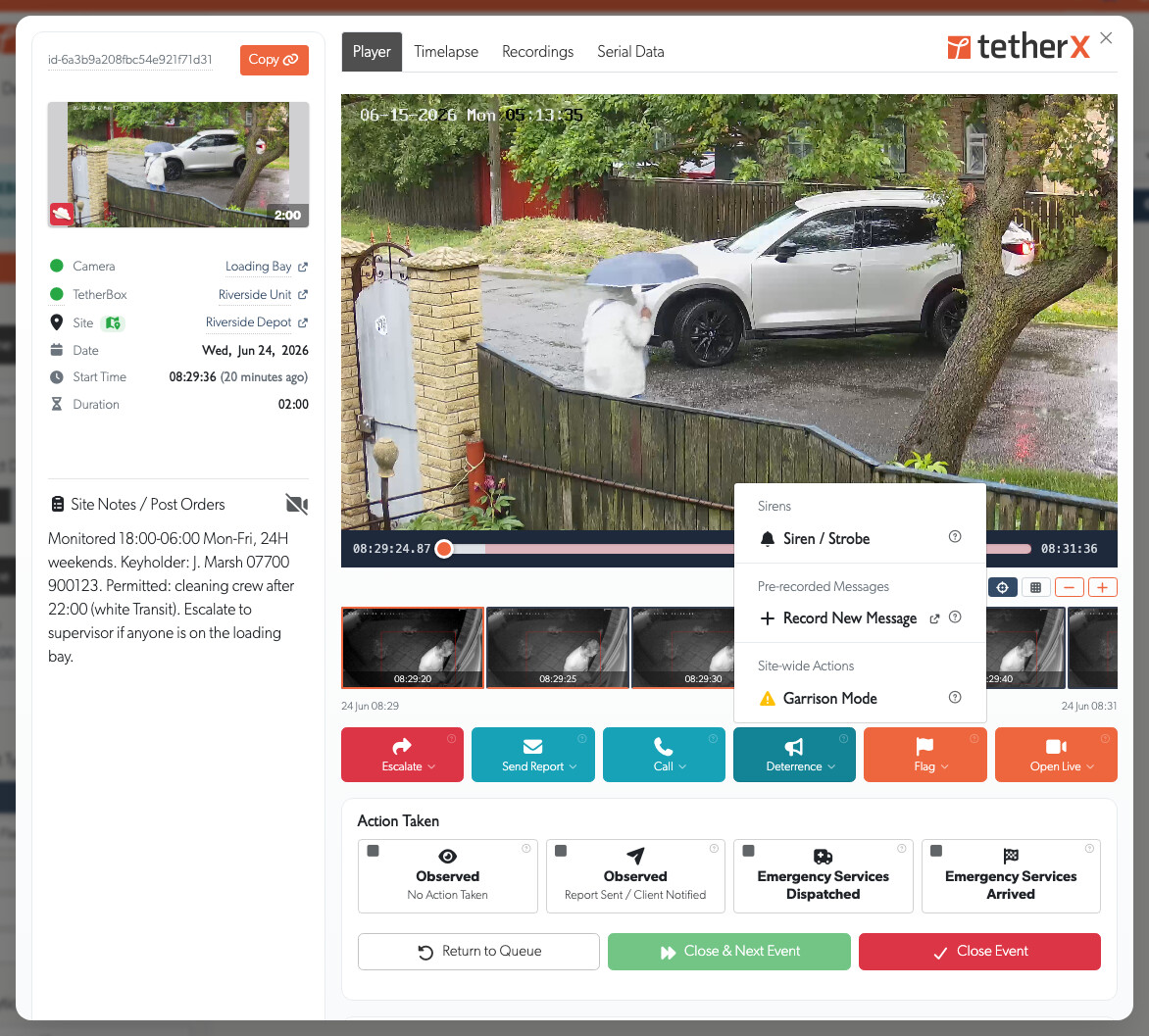
Speak to people on-site straight from a camera's live view or the operator console: hold a button to talk, play a pre-recorded warning, or hold a full two-way conversation on cameras with built-in echo cancellation. Each camera chooses where its audio plays, the TetherBox 3.5mm jack, a network (IP) speaker, or the camera's own speaker, and IP speakers are registered once from the Devices page. It works through the camera's own speaker on most major brands (Hikvision, Dahua, Axis, Hanwha, Uniview and many more) using native two-way audio or the ONVIF Profile T backchannel, and with any camera at all when routed to the TetherBox jack or an IP speaker. See Talkdown.
ARC Performance Reports
Pre-aggregated daily reports for Alarm Receiving Centres showing event handling, operator performance, and camera activity. Trends page displays 60-day charts for events and response times. Day details show KPIs, hourly breakdowns, operator tables, and busiest cameras with direct links.
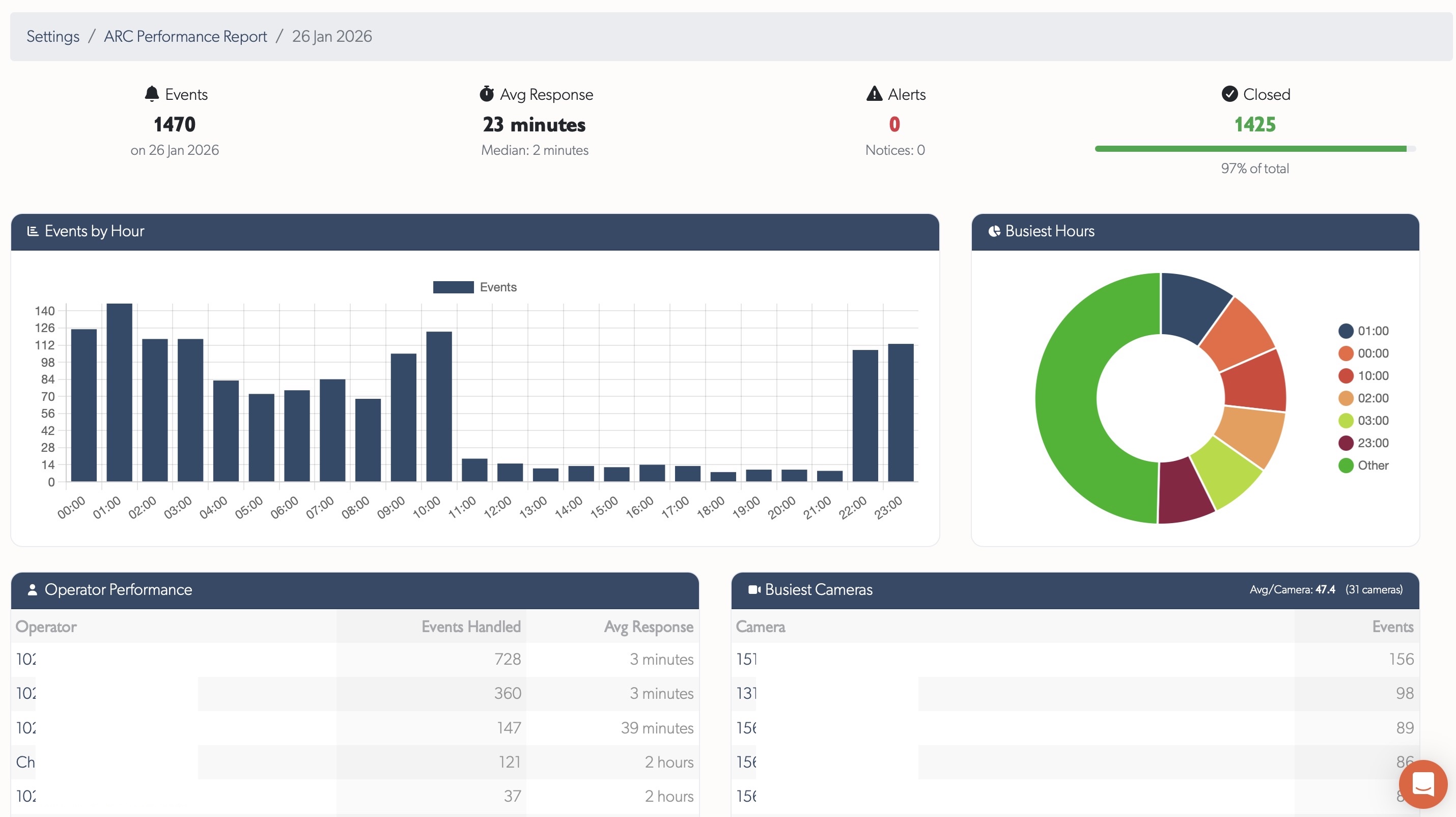
See ARC Performance Reports for full documentation.
Control Room Slowdown Diagnostics
New internal diagnostic tooling enables TetherX support to instantly investigate operator-reported slowdowns. In alarm receiving and control room environments, real-time operation is paramount - seconds matter when key holders or police need to be contacted during serious events. Issues that previously took hours or days to diagnose now take seconds.
Operators simply provide a 5-10 minute time window in their local timezone. Diagnostics then analyse rate limiting, temporary IP bans, server errors, TetherBox updates, service health, VPN connectivity, and request patterns across all system layers.
See Q1 2026 release notes for full details on all diagnostic capabilities.
Health Monitoring
Proactive care: spot problems before they become outages.
Proactive Fault Detection
Automatically flags units with frequent reboots (>1 in last 2 days) or unstable connections (>1 reconnect in last 2 days) with clear counts and investigation links. Health Reports highlight units requiring attention - frequent reboots suggest UPS issues, frequent reconnects indicate network instability.
Tip: Review your Health Reports to identify units with frequent reboots or unstable connections before they cause service problems.
Health Report Redesign
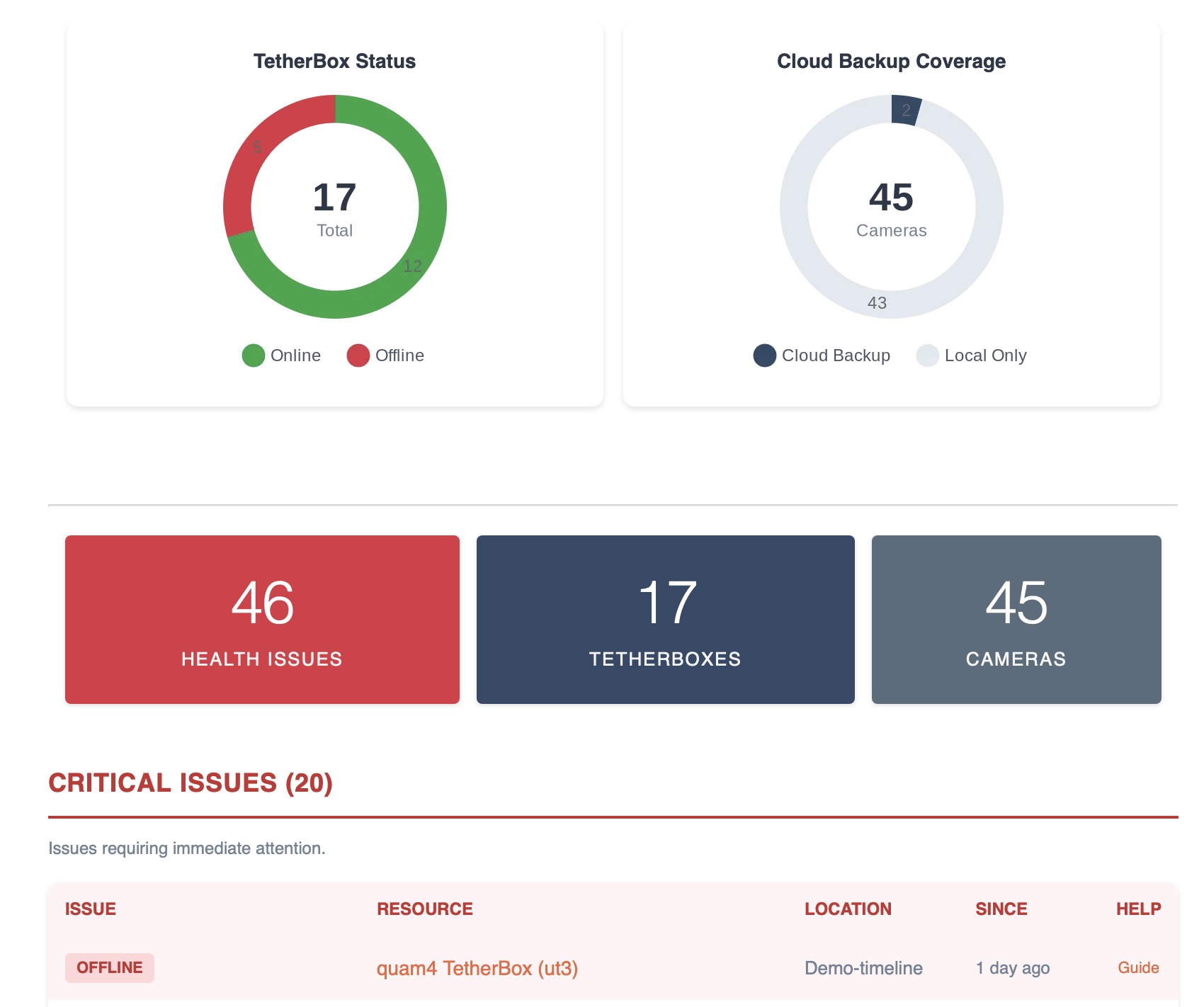
Health Report email completely redesigned with colour-coded health tables - Critical Issues (red), Noteworthy (orange), Suggestions (blue), and Monitored Devices (purple). Each issue type links directly to the affected resource and relevant help documentation. Includes a comprehensive legend explaining all 19 issue types covering TetherBoxes, cameras, drives, and monitored network devices.
Health Reports list TetherBoxes installed at a site, so equipment waiting for installation never appears as an offline customer system.
Third-Party Uptime Monitoring
Every TetherBox now has a public, passwordless probe endpoint that returns HTTP 200 when the unit is genuinely reachable and healthy, or a 5xx error when it is not. Point Uptime Kuma, Uptime Robot or any HTTP monitor at it, alert on non-200 status, done.
See Uptime Monitoring for setup examples and the full list of supported tools.
Platform & Workflow
Your platform, your way: faster everyday operations.
Redesigned Tables
Every data table in the platform has been rebuilt from the ground up. Columns can be resized by dragging edges, reordered by drag-and-drop, and shown or hidden. Your preferences are remembered per table so the layout is always how you left it. Server-loaded tables support export to CSV or Excel. Camera tables feature model images and colourful letter avatars for quick visual identification, with inline editing and row-click to open details.
Every table now looks the same wherever you meet it, the events list included: the same row height, the same line between columns, the same striping, and the same shading under the pointer, on the light theme and the dark one. The bar heading a table and the bar heading the card it sits in match each other, and a heading inside a card reads as a heading rather than as another line of text.
Acting on a Whole Selection
Tick rows on a list and the toolbar offers Edit and Delete for everything you ticked, on accounts, sites, zones, network devices, alarm panels and access control systems, beside the camera and TetherBox lists that already had it. The edit window carries the record's own tabs and headings and only the fields your account may set, and it leaves every field alone until you tick that one, so you change the two things you meant to change across forty records rather than opening forty pages. Accounts also pick timelines there, and then the sites or zones inside each of them, exactly as one person's Permissions tab reads. A selection is never a way round a check: it acts only on records you could have edited or deleted one at a time, and a record that refuses is named with its reason while the rest go through.
Moving a TetherBox Between Timelines
A TetherBox can be moved to another timeline from the Actions section of its page, taking its site, cameras, zones, network devices, alarms, access control and its whole event history with it, so nothing has to be set up again and nothing is lost from the log. Footage recorded on the TetherBox is kept, where moving a customer between timelines previously meant a factory reset and losing all of it. Cloud footage is the exception, because cloud storage paths are built from the timeline name, so you are told how many cameras and how much footage will be deleted before you confirm. The move runs in the background and we email you when it finishes, or if it does not.
Site-Level Access
Integrators, administrators and distributors can be limited to particular sites. Their Permissions tab has a Site access section with an All sites switch, one per timeline, which starts switched on so nothing changes for anyone until you deliberately turn it off. Turn it off and you tick the sites that person should reach; everything follows from that choice, events, live view, recordings, cameras, TetherBoxes, alarms and number plates alike. A direct address cannot open another site, its map pin or its equipment. The list only ever offers the sites you can see yourself, so nobody can hand out access they do not have.
File Attachments in Notes
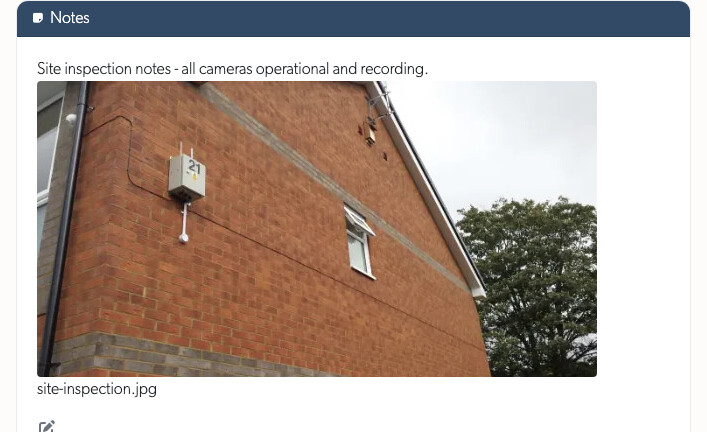
Notes editors across the platform now accept file uploads by drag and drop, paste, or the attach button, for images, documents (PDF, Word, Excel, PowerPoint, CSV) and video up to 100MB. Attachments show as thumbnails you can click to view full size, and a new management page under Settings lists every uploaded file, which resource it belongs to, and lets you filter by type or status to find and remove unused ones.
A Reseller's Own Colours, Everywhere
A brand's two colours used to reach the top menu, the footer and a handful of buttons. Everything else was compiled into the stylesheet every subdomain shares, so it stayed TetherX orange and navy: the heading on every card and table, the switches, the recording seekbar, the slider handles, the chosen view icon, the tick boxes, and the rows you pick out of a list. On a brand whose colours are nothing like ours that read as a half-finished skin rather than a choice.
The two colours now reach the whole application, in the light theme and the dark one, and a brand set up today carries them without anything being compiled for it. A colour the brand form does not recognise as a colour falls back to the TetherX one rather than being painted.
Events & Playback
See exactly what happened, and find it faster.
Panel State Events
An alarm panel being armed, disarmed, online or offline now appears as its own event. Map the panel row to the camera facing the keypad to keep that action with the relevant footage, or leave it unmapped to retain it as a site event.
Richer Event Classification (in progress)
Events are being reorganised around the specific behaviour that triggered them, not just "motion". Fifteen meaningful categories keep PPE violations separate from vehicle violations separate from number-plate detections separate from environmental alarms, so filters and notifications target exactly what you care about.
Supports the richer TetherBox-AI output: specific vehicle violations (speeding, wrong way, red-light), PPE checks (helmet, hard hat, safety vest, mask), access control events (plate allowed / denied / guest), and demographic analytics where the camera provides them.
The help page listing every event type now regenerates itself whenever new detections are added, so customers always see the current capability without waiting for documentation updates.
Event Player
A fully redesigned player with continuous, gapless playback across the entire event, replacing the previous one-recording-at-a-time limitation. Recording segments dropped from 60 seconds to 10 for faster downloading and scrubbing.
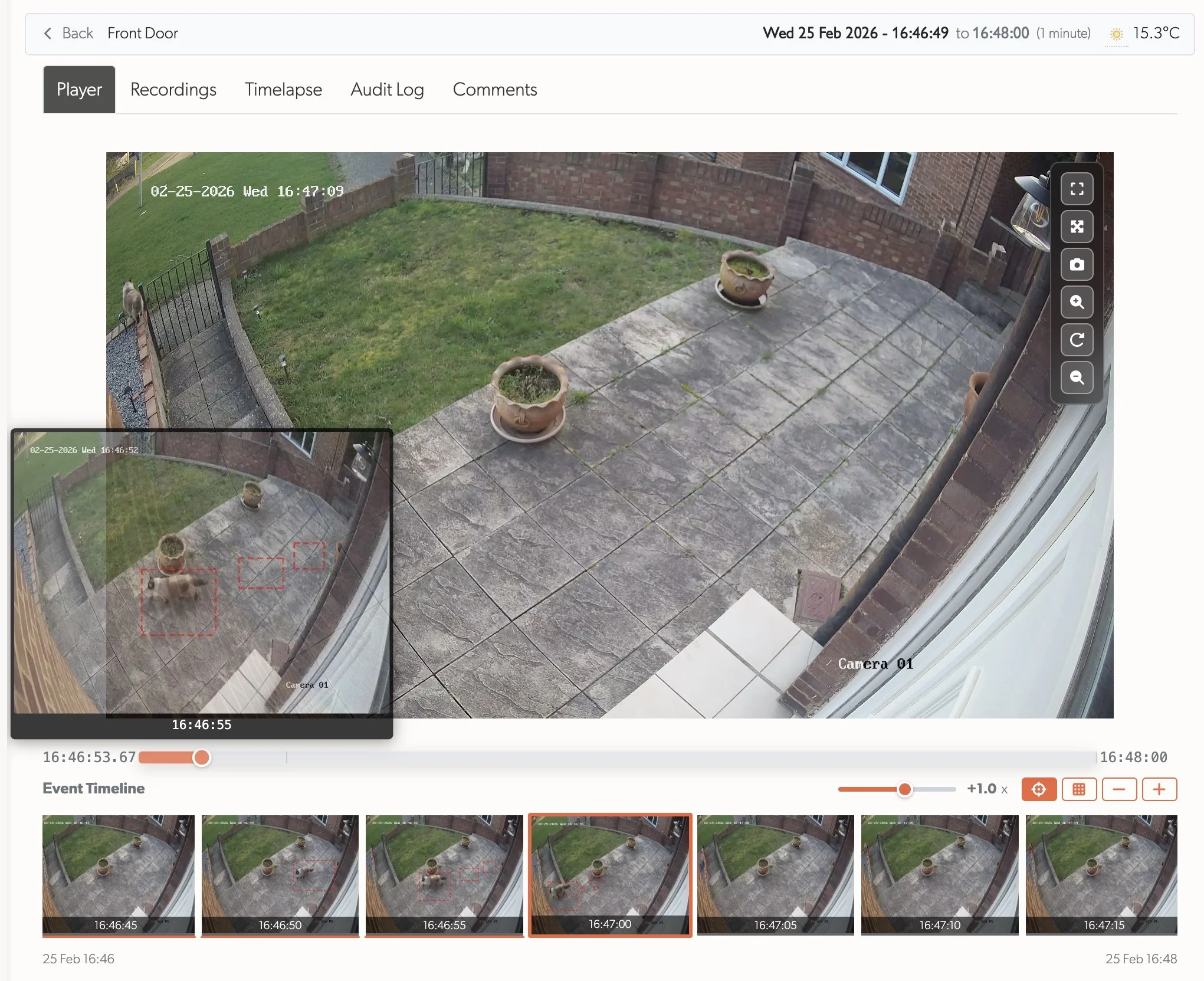
Scrub with instant thumbnail previews of the best snapshots, a timeline filmstrip showing what happened every 5 seconds, precise wall-clock timestamps, variable-speed playback, and inline or fullscreen modes. Automatic error recovery skips past corrupt video segments without interrupting playback.
See Q1 2026 release notes for full details.
Unified Event View
Events now open in a focused pop-up over the list, the same clean layout for everyone, so reviewing an incident never loses your place in the events list. The metadata sits in a tidy column beside the player, and each thumbnail carries a status pill - pending, closed or hidden - naming who actioned it, when, and how long it took from the event starting to being dealt with. An open event keeps itself live as it develops, pulling in new footage without interrupting playback and never throwing you off the tab you are on, and the open event is held in the address bar so a refresh or the browser back button brings you right back to it.
A new Control Room panel makes a monitoring station's work visible to the site: observed, report sent, or emergency services dispatched and arrived. Anyone reviewing an event can also help by closing false events themselves, the same workflow operators use in the operator console.
One Layout, Any Orientation
Recording and event pages now share a single layout that fits any screen instead of switching between separate mobile and desktop versions. Turn a phone to landscape and the video sizes itself to the space rather than running off the bottom, with the thumbnail strip and extra playback controls (speed, grid, size) tidied away so the picture and its scrub bar are all that remain. The metadata reads under the video with no sliding drawer, page content stays clear of the screen notch, the full-screen button works on iPhone, and the live camera wall re-fits as you rotate. On a slow connection the scrub bar shows a spread of preview thumbnails straight away, so you can see progress and jump close to the right spot without waiting for the whole timeline to load.
Account Access
Microsoft Sign-In
Accounts can sign in with Microsoft as well as Google. A work, school or personal Microsoft account opens the existing TetherX account with the same email address, including its usual two-factor authentication checks.
Documentation
Help and developer resources, built right into the platform.
Platform Knowledge Base
Full knowledge base built into the platform - browse Cameras, TetherBoxes, integrations, and troubleshooting without leaving your workflow. Hashtag-based search with instant filtering, contextual help links where needed, and user comments on every article (staff moderated). Submit feature requests, bug reports, device compatibility requests, and offline reports with unique reference numbers for tracking.
Exporting Camera Data and Snapshots distinguishes spreadsheet exports from the ZIP file of current camera JPEGs, with screenshots of both export steps.
Tip: Press ? or click the Help menu to search documentation, browse articles by topic or tag, and submit feature requests or bug reports.
Interactive API Documentation
Replaced the static API documentation with an interactive API explorer served directly from the platform. The documentation uses your deployment's actual domain, so white-label customers see their own URLs, not hardcoded defaults. A comprehensive API Getting Started guide covers authentication setup, authorisation flow, and rate limits.
Tip: Visit API Reference to explore all endpoints interactively, or start with the API Getting Started guide for OAuth2 setup.
AI Insights
Intelligence built-in: advanced AI analysis for your installations.
AI Drive Health Analysis
AI-powered drive health analysis compares SMART metrics from installation against current readings, combined with drive specifications, temperature trends, system workload, and reboot history. Identifies degradation trends and potential failures before they occur.
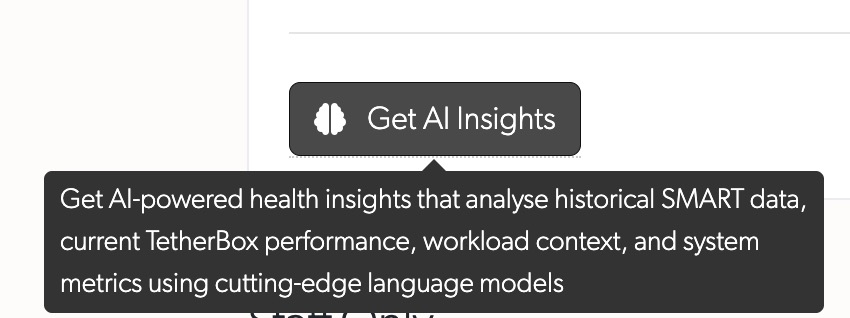

Delivers actionable reports with health status, estimated remaining life, and recommended actions.
More AI Insights coming soon for TetherBox health and performance.
Statistics
| Quarter | Commits | Lines Added | Lines Removed | Net Lines |
|---|---|---|---|---|
| Q1 | 163 | 98,075 | 46,312 | +51,763 |
| Q2 | 217 | 93,667 | 45,907 | +47,760 |
| Total | 380 | 191,742 | 92,219 | +99,523 |