
Table of Contents
Q1 2026 Release Notes
January - March 2026
Highlights
Audio Analytics: TetherBox now supports audio analytics — classifying sounds into 7 groups (emergency, alarm, voice, animal, vehicle, intrusion, weather) with 63 individual sound classes. Audio events appear with distinctive purple icons on event thumbnails, and can be filtered and notified on independently from video analytics. Loud sounds above 99 dB SPL are automatically flagged.
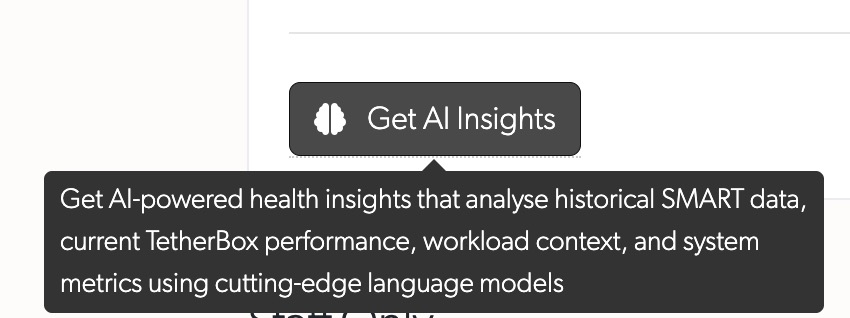
AI Insights: Advanced AI analysis for drive health monitoring. Compares SMART metrics from installation against current readings, combined with drive specifications, temperature trends, system workload, and reboot history to identify degradation and potential failures.

Automatic Configuration: TetherBoxes now automatically configure camera stream settings for optimal performance - no manual configuration required. This saves integrators significant setup time by automatically configuring bitrate, codec, profile, framerate, and resolution. Requires compatible camera with native APIs (Hikvision, Merit-Lilin, Homaxi and many others) or ONVIF. Manual override available via "Disable Defaults" toggle. Configuration suggestions displayed with clear explanations when automatic configuration isn't available.
Platform Knowledge Base: Help and documentation are now fully integrated into the platform. No more switching to external knowledge bases or searching through generic answers. Get contextual, actionable guidance exactly where you need it - directly within your workflow. Search by topic, browse by tag, and collaborate with comments on every article.
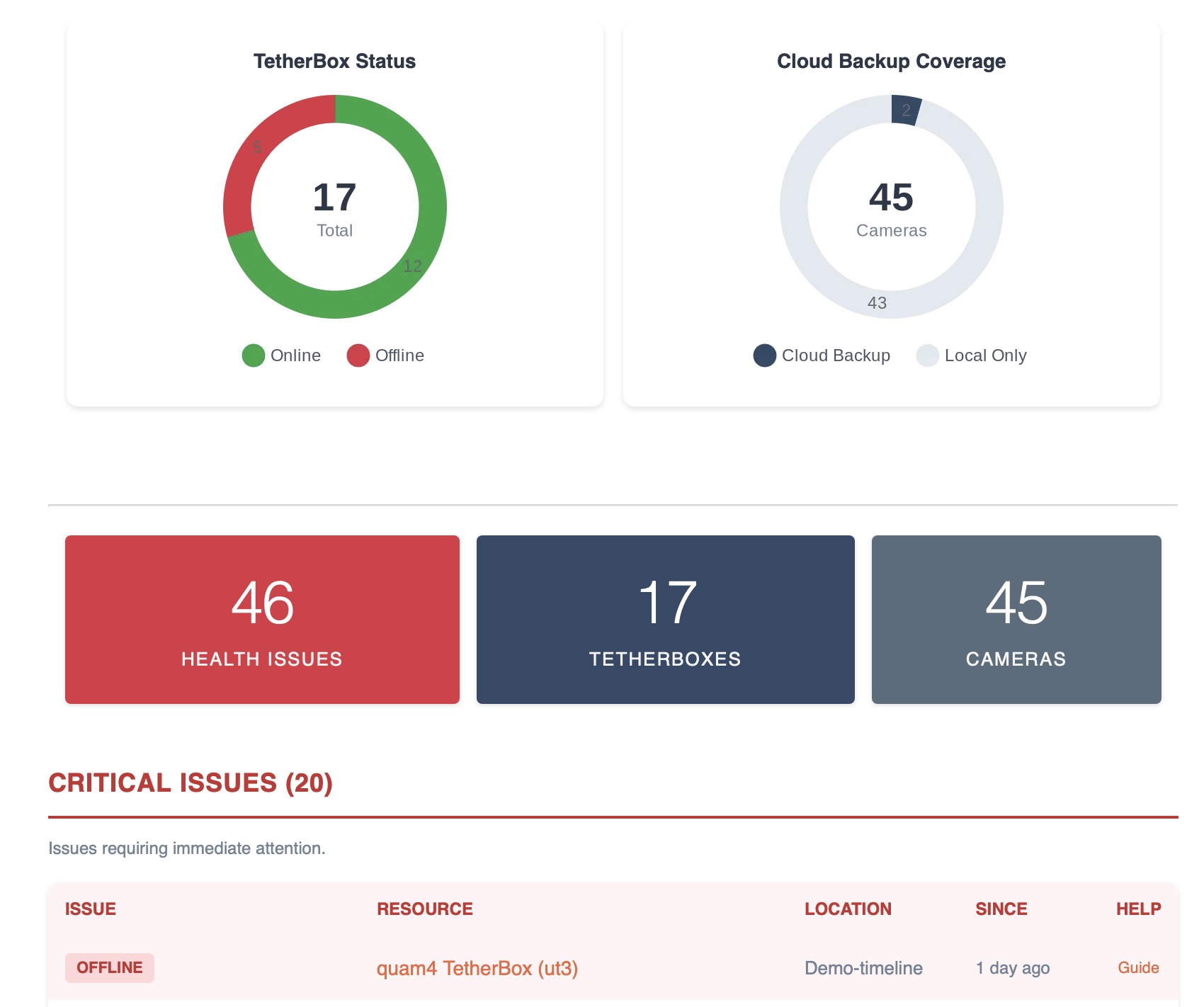
Health Report Redesign: Health Report email completely redesigned with summary cards showing total issues, TetherBox issues, and Camera issues at a glance. Organised health tables - Critical Issues (red), Noteworthy (orange), Suggestions (blue), and Monitored Devices. Each issue links directly to the affected resource and relevant help article with resource type icons (◼ TetherBox, ◉ Camera, ◆ Device, ▣ Drive). Alternating row backgrounds improve readability. Shows specific camera error states instead of generic "Error" label.
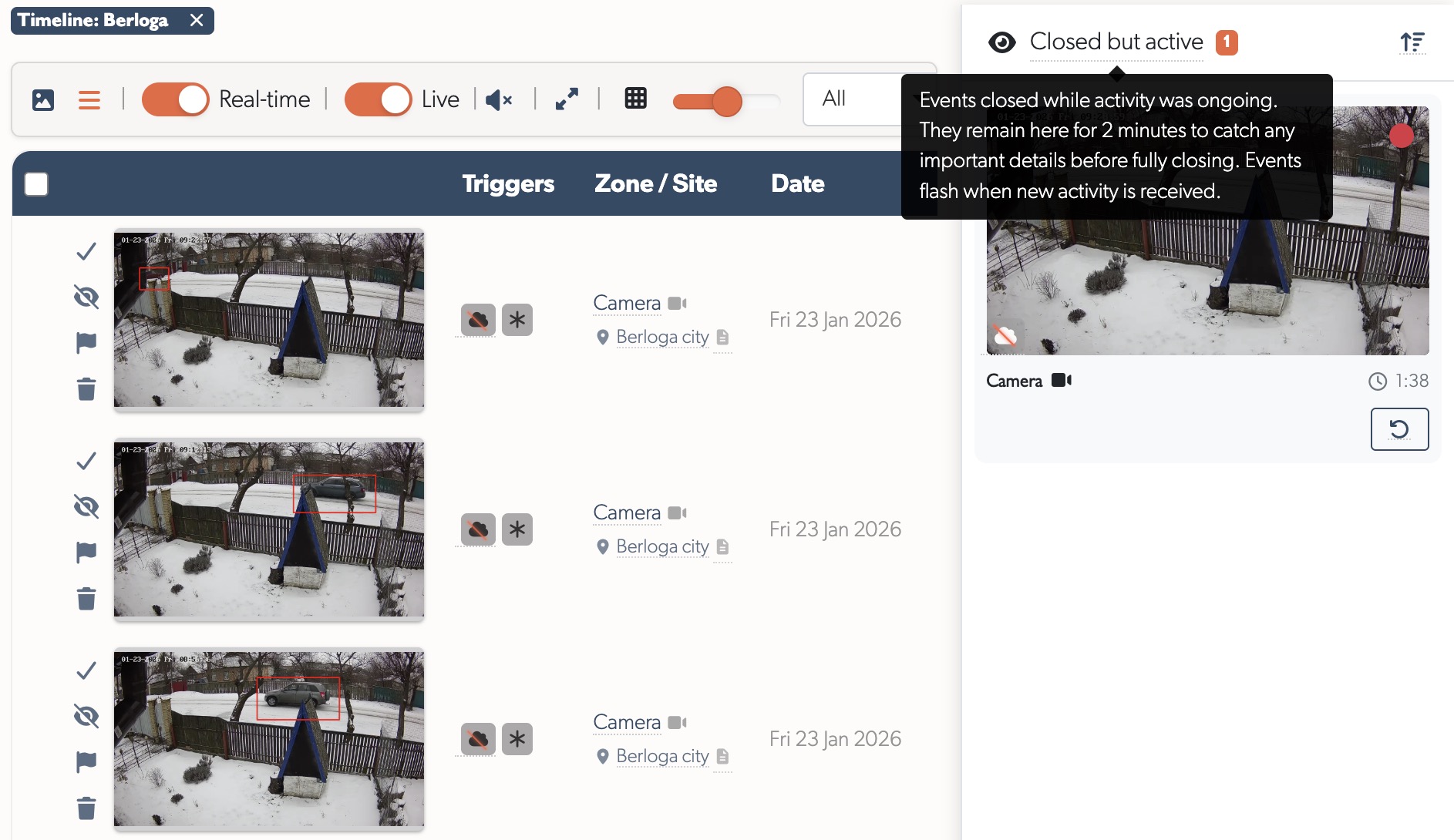
Monitoring Strip for ARCs: New event workflow for monitoring stations. Closed events with ongoing activity move to a Monitoring Strip instead of disappearing - with countdown timer, activity alerts, and one-click reopen. Dramatically reduces missed incidents and event volume. See the Monitoring Station Operator Guide for details.
Tip: If you'd like your TetherBox professionally monitored by an Alarm Receiving Centre, or want to add police response to your site, contact TetherX Support to discuss options.
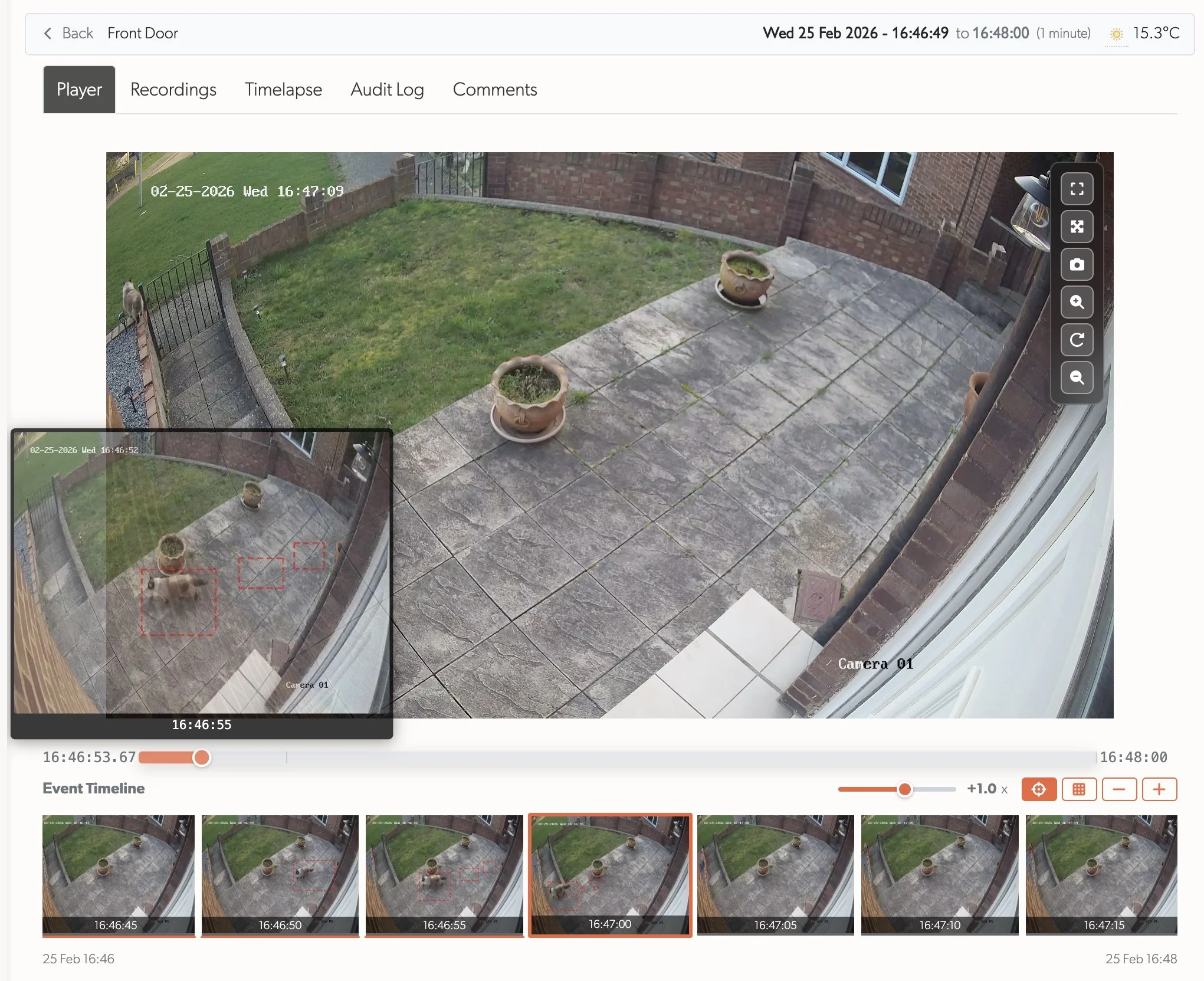
Event Player: Completely redesigned event playback with gapless, continuous video across the entire event — a long-standing request replacing the previous one-recording-at-a-time limitation. Recording segments reduced from 60 seconds to 10 seconds for faster downloading and scrubbing. Scrub with instant thumbnail previews, event timeline filmstrip with 5-second snapshots, wall-clock timestamps, variable-speed fast-forward/rewind, and inline expand or fullscreen modes.
ARC Performance Reports: Daily pre-aggregated reports for Alarm Receiving Centres showing event handling metrics, operator performance, and camera activity. Trends page displays events per day and response time trends over 60 days with paginated report history. Day detail pages show KPI cards (total events, average response time, alerts, closed percentage), hourly event distribution charts, operator performance tables with response times, and busiest cameras - all with direct links to users and zones.
This quarter focuses on continued reliability improvements.
User-Visible Changes
User Interface
- Improved Tooltips & Popovers: Completely reworked tooltip and popover system for better experience across different screen sizes. Live view and event thumbnail previews are now larger and properly positioned
- Dark Mode Enhancements: Comprehensive dark mode styling improvements across tooltips, popovers, modals, tables, form elements, and support forms for better contrast and readability
- Timelapse Navigation: Prev/Next buttons added to timelapse show page sidebar for stepping through frames in 5-second increments
- Compact Recording Player: Recording show page now displays a compact (854px max-width) player by default on desktop, with an expand/collapse toggle. Preference is persisted across page loads
- Event Sidebar Tooltip: "Recordings during" button on the event sidebar now includes a tooltip explaining it searches recordings from all cameras during the event's time window
AI Insights
- Drive Health Analysis: "Get AI Insights" button on drive pages provides comprehensive health assessments with degradation trends, wear patterns, and failure predictions
- Expert-Level Reports: Health status (Good/Fair/Poor/Critical), key concerns, estimated remaining life, and recommended actions
Platform Knowledge Base
- Integrated Documentation: Full knowledge base built into the platform - no external sites, no context switching. Browse Cameras, TetherBoxes, integrations, and troubleshooting guides without leaving your workflow
- Smart Search & Tags: Find exactly what you need with hashtag-based search across all documentation. Click any tag to discover related articles instantly
- Collaborative Learning: Comment on any article, ask questions, and share solutions. Build institutional knowledge with your team, moderated by staff
- Contextual Help Links: Relevant help articles appear exactly where you need them - TetherBox offline? Quick access to troubleshooting and offline report forms directly from the status page
- New Support Forms: Submit feature requests, bug reports, device compatibility requests, and offline reports with unique reference numbers for tracking. Bug reports now support file attachments (screenshots, screen recordings)
- Improved Bug Report Form: Bug reports now collect structured context — affected area, when the issue started, affected sites, access type (on-site/remote/mobile), network speed test results, TetherBox, and device make/model. Browser, OS, screen resolution, timezone, and connection type are captured automatically. All support emails now include an Environment section with this context
- Monitoring Station Operator Guide: Comprehensive guide for ARC and remote monitoring station operators covering event processing workflows, monitoring strip behaviour, live preview features, site notes, and reporting performance issues
- ARC Performance Report: Dedicated support form for monitoring station operators to report slowdowns or freezes, collecting diagnostic information including time window, timezone, affected sites, speed test results, and workstation specs
- Training Request Form: New support form for booking TetherX training sessions for your engineering team
- Redesigned Help Sidebar: Flat navigation organised by feature and user type replaces nested accordion menus for faster access to common topics
- Quick Feedback Access: Direct links to feedback forms and release notes from the Help menu
- Error Page Support: 404, 422, and 500 error pages link directly to feedback forms for immediate issue reporting
- User Permissions: Comprehensive guide to configuring what each user can access - permissions, notifications, timeline access, and zone/camera restrictions. Addresses common configuration questions with practical examples and clear explanations
- Image Enlargement: Click any image in help articles to view full-size in a modal overlay
- Syntax Highlighting: Code blocks in help articles now display with GitHub-style syntax highlighting for better readability
- Staff-Only Sections: Help articles now support staff-only content blocks, visible only to TetherX staff with a purple badge indicator. Used for internal process details like the Subscriptions Report
- Nested Table of Contents: Help articles now show subheadings (H3) nested under their parent sections (H2) in the table of contents for easier navigation of longer articles
- Print Stylesheet: Help articles now print cleanly with branded header (logo, title, URL, date), optimised typography, clean tables, and no UI clutter. Perfect for creating offline reference documents or sharing printed guides
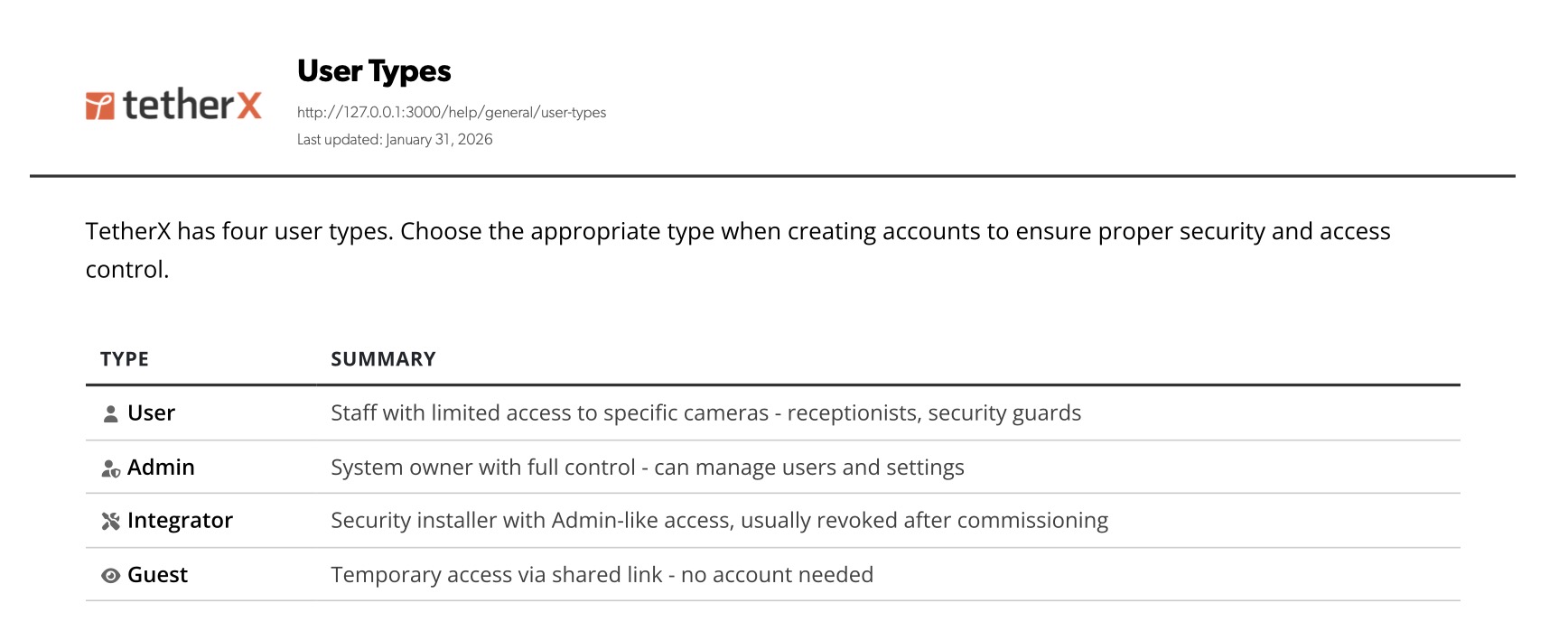
- New Documentation Articles:
- TetherBox landing page with product overview, models, and use cases
- Events consolidated guide covering finding, filtering, flagging, sharing, and downloading footage
- Integrators Getting Started onboarding guide for new integrators
- Audit Log for activity tracking and compliance
- Frequently Asked Questions quick answers to common questions
- Supported Devices and Integrations overview of all TetherX-compatible devices
- Camera Troubleshooting step-by-step camera issue diagnosis
- Control Room Software Integration for ARC software setup
- ANPR setup and configuration with step-by-step integration guide
- ANPR Whitelist with IP Relay for automatic gate/barrier control
- SIA Protocol integration for alarm monitoring systems
- Sentinel Immix integration guide for control room software
- Audio Challenge setup for two-way audio and speaker broadcast
- Device Detection explaining automatic network device discovery
- Storage management and external drive configuration
- AI Insights guide for drive health analysis
- Events View Menu explaining filtering, grouping, and display options
- Invalid Paths troubleshooting for stream configuration errors
- Health Report explaining issue categories and sort order
- Factory Reset guide for decommissioning and relocating TetherBoxes
- TetherBox Firmware Updates explaining scoped rollouts and update timing
- Request Throttling documenting rate limits and security protections
- Camera Notification Settings for configuring which camera events trigger notifications vs are ignored
- Marketing PDFs downloadable brochures and sales materials for integrators
- Hikvision Setup configuration guide with analytics setup, firmware updates, and Hik-Connect compatibility
- Hanwha Setup codec configuration and profile settings
- Mobotix Setup ONVIF integration and event configuration
- Uniview Setup basic setup and RTSP URL format
- Redvision Setup ONVIF protocol configuration
- PTZ Setup enabling PTZ controls and live view usage
- Monitor vs Record Mode explains the two camera modes and when to use each
- Reset Password step-by-step password reset guide
- SLA service level agreement and support terms
- Questions to Ask Your Security System Supplier checklist for facility managers evaluating systems
- Emergency Console Login TetherBox recovery mode troubleshooting guide
- Hikvision AX Pro Integration alarm panel setup via Hik-ProConnect
- Live View feature guide with layouts, presets, and streaming modes
- Local Streaming troubleshooting guide for on-site video access without Internet
- Connecting your TetherBox to the Internet rewritten with improved messaging and style
- SIA Event Codes complete reference of all supported alarm event codes
- Axis Setup PTZ configuration and ONVIF integration
- Audio Recording enabling and troubleshooting camera audio
- Cloud Backup Setup configuring cloud storage for cameras
- VMD Event Types understanding video motion detection events
- Timelapse creating and exporting timelapse videos
- Video Checksum verifying video file integrity
- DNS Settings configuring DNS for TetherX access
- Health Dashboard fleet health overview for staff
- Support Access controlling TetherX support access to your account
- Timezones timezone configuration for sites and users
- User Types understanding different user roles and permissions
- Service Subscription Billing billing cycles and subscription management
- Quote Tool generating customer quotes
- TetherBox Deployment pre-configuring drives and installation
- TetherBox Activation activating new TetherBoxes step-by-step
- Drive Replacement replacing storage drives in TetherBoxes
- Time Sync troubleshooting TetherBox time synchronisation
- Warranty & Returns warranty terms and RMA process
- API Getting Started OAuth2 setup guide for developers
- API Reference interactive Swagger UI documentation for all API endpoints
- Interactive API Documentation: Replaced the static Slate-based API docs with an interactive Swagger UI page at
/help/developers/api-reference. The new docs use your deployment's actual domain (solving white-label URL issues), include a Getting Started guide with OAuth2 setup, authentication requirements per endpoint, and troubleshooting. Served directly from the platform with no separate build pipeline. Old/api-docsURLs redirect automatically
TetherBox
- Offline Report: TetherBox details page now shows a prominent offline alert at the top when the unit is offline, with quick access to the troubleshooting guide and offline report form. Offline notification emails include a "Submit Offline Report" button alongside the troubleshooting link
- Update Status Accuracy: TetherBoxes no longer show "updating" status when an update failed to start or complete due to connectivity issues, timeouts, or other problems. The status banner now only appears when an update is actively in progress
- Update Duration: Updates tab now shows how long each firmware update took for reference
- Frequent Reboots & Reconnects Detection: TetherBoxes with frequent reboots (>1 in last 2 days) or reconnects (>1 in last 2 days) now display warnings on the unit page with clear counts and links to relevant tabs for investigation. Health Reports also flag units with frequent reboots (>2 in last 7 days, suggesting UPS) or reconnects (>5 in last 7 days, indicating network instability)
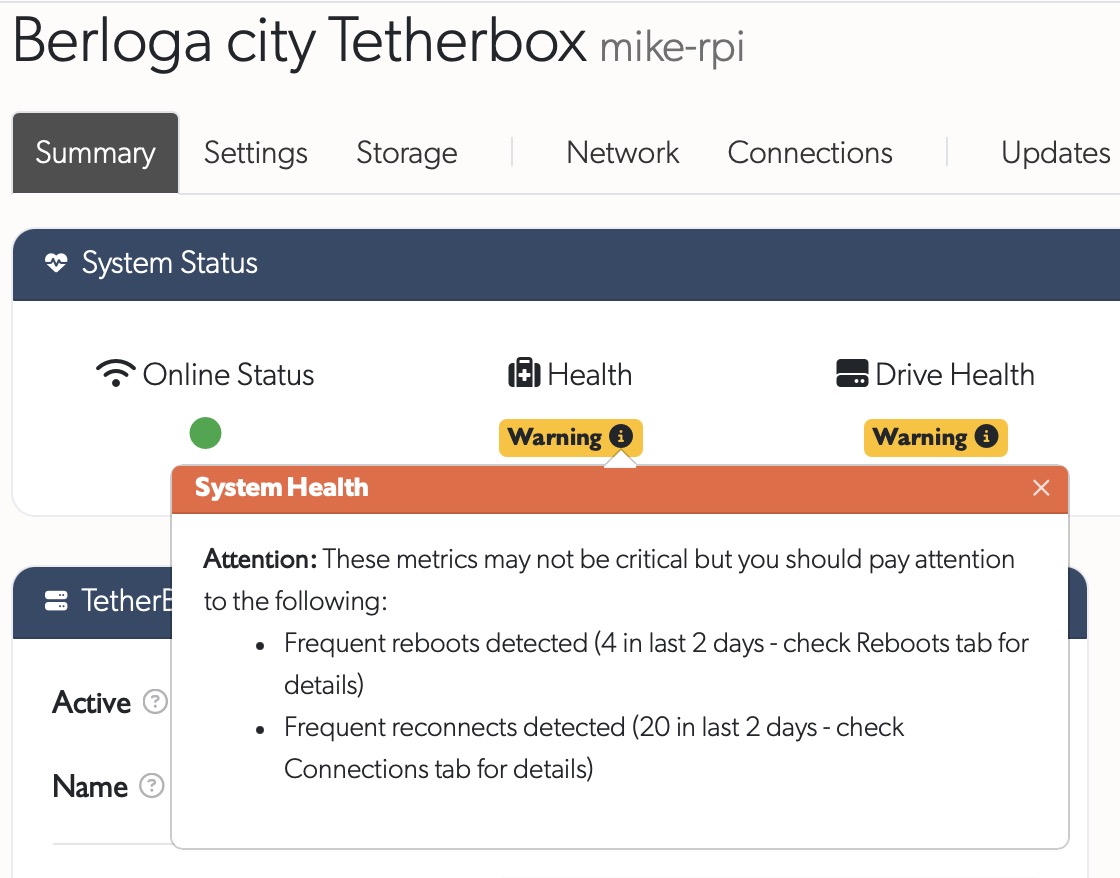
Tip: Proactive detection identifies units with frequent reboots or reconnects before service issues - review your Health Reports regularly to catch problems early.
- Confirmed Fault Alert: TetherBoxes with a confirmed fault now display a prominent alert banner at the top of the unit page, with the fault message from TetherX staff when available
- Drive Health Tooltips: Improved drive health display with specific drive counts and causes; system log errors now show as softer "Check Logs" warning with clearer explanation
- Inadequate Storage Warning: TetherBoxes with insufficient storage (single drive ≤130GB) now display a critical health warning on the unit page, making it immediately visible when storage is too small for reliable recording
- Map Filter Bar: TetherBox map now shows active filter badges matching Companies map
- USB Device Management: New USB tab on TetherBox details page showing all connected USB devices with their status and storage details. Reset, power off, power on, or safely eject USB drives directly from the interface. Eject button also available in the Storage tab for quick access
- Hikvision ONVIF Auto-Setup: Enabling ONVIF on Hikvision cameras now automatically creates the required ONVIF user account. On these cameras, ONVIF has its own user database separate from the web interface — so enabling the protocol without also creating a user would cause all ONVIF connections to fail
Companies
- Improved Map Popup: Redesigned Companies info popup with cleaner table layout, prominent partner status badges (Gold, Silver, Bronze, OEM, Authorised), and View/Edit action buttons
Cameras
- Camera Path Validation: Cameras now validate that
analytics_path,recording_path, andsnapshot_pathcontain only path components (e.g./rtsp/streaming?channel=1) not full URLs (e.g.rtsp://10.0.0.19:554/rtsp/streaming). Prevents configuration errors that cause duplicate URLs and snapshot timeouts - ONVIF Profile Path Configuration: Cameras now automatically use actual stream paths from ONVIF profiles instead of vendor defaults when available. Highest resolution profile becomes
recording_path, second highest becomesanalytics_path. This ensures correct stream paths for cameras with non-standard configurations (e.g. IEEE Authority vendor). Paths are also auto-populated when ONVIF profiles arrive via heartbeat after camera creation - Config Updated Column: New sortable column in Cameras table showing when configuration was last manually changed
- Configuration Suggestions: Cameras display configuration suggestions with a clickable popover in the index. Suggestions flag issues like bitrate too high for resolution, sub-optimal analytics stream settings, I-frame interval exceeding framerate, TetherBox CPU overload (>85% or Load >3), 100Mbit network interface, and footage gaps. Each suggestion includes clear guidance with actionable links to troubleshooting guides

- Footage Gaps Troubleshooting Guide: New help article covering common causes of footage gaps including firmware issues, overheating, network congestion, PoE power problems, and packet loss detection
- Disable Defaults Toggle: New toggle in Cameras advanced settings to disable automatic configuration when manual control is preferred
- Disable API Option: New toggle in Cameras advanced settings to disable API communication (ONVIF, ISAPI, native APIs). Useful for Cameras lacking API support, with undocumented APIs, or buggy APIs causing errors
- Motion Detection & Basic Analytics: Automatic configuration enables motion detection and basic analytics on supported cameras. Advanced analytics requiring spatial configuration (tripwire, intrusion zones, etc.) must be configured manually through the camera interface as placement depends on your specific monitoring requirements
- Supported Cameras: Native API support for automatic configuration available on Hikvision, Dahua, Homaxi, and Merit-Lilin cameras. ONVIF supported for broader camera compatibility with more limited configuration options
- Camera Model Images: Added product images for Hikvision DS-2CD2T46G2H-IS2U/SL, Hikvision DS-2CD4A25FWD-IZS, NoctisPro NP-C-T4E30-M-40, and Merit-Lilin P6W4482E2
- ANPR Plates Resync: New "Resync Plates" button in ANPR Plates tab deletes all plates stored on the TetherBox and re-sends them from the database. Useful when plates were added while TetherBox was offline, after TetherBox replacement, or when whitelist matching isn't working despite correct configuration
- ANPR Whitelist with IP Relay Guide: Comprehensive troubleshooting guide for ANPR whitelist and relay automation - covers relay path formats for different manufacturers (ControlByWeb, Robot Electronics, KMtronic, Denkovi, Moxa), manual testing procedures, and step-by-step diagnosis for barriers not opening
- Camera Export Improvements: Camera passwords are now filtered by default in CSV/Excel exports for security. A "With passwords" checkbox in the export dropdown explicitly opts in to include credentials. The "Active" column has been replaced with a "State" column showing Off, Monitor, or Record. New Exporting Camera Data help article documents all export options including bulk camera snapshots
- Secure RTSP: New toggle in Cameras advanced settings to use RTSPS (encrypted RTSP over TLS) for cameras that require secure connections such as UniFi Protect, Verkada, and Axis cameras with mandatory HTTPS enabled
Camera Lockout Detection: Camera status now detects when a device has locked out further login attempts after too many incorrect credential entries. Shows a clear "Camera Locked" status with guidance on power cycling or waiting for the lockout to clear. Also surfaces wrong credentials warnings when the camera is rejecting authentication and streams are failing
Camera API
API Tab: New camera API tab (replacing staff-only ONVIF tab) showing device information, ONVIF/native API status, stream profiles with codec badges and key frame intervals, detected capabilities, available services, event capabilities, video sources, I/O ports, PTZ capabilities (axes, presets, home, preset tours), and analytics engines with LPR detection
Codec Profile Badges: Stream profile badges now show the H.264/H.265 profile (High, Main, Baseline) alongside codec and resolution for quicker stream assessment
API Manufacturer Detection: Camera index and details pages show the API-reported manufacturer when it differs from the MAC vendor (e.g. "Hikvision" on an OEM rebadge), with tooltip explanation
ONVIF/Native Profiles: Camera stream profile data is now stored for richer configuration display and future stream management
Stream Configuration: View and adjust stream settings (resolution, codec, framerate, bitrate, quality, I-frame interval, profile) for all camera streams directly from the API tab. Each stream is labelled with its profile name for easy identification. "Recommended Defaults" applies optimal settings in one click
Camera Reboot: Reboot cameras remotely from the camera details page via the API
Native API Profile Display: Cameras using Hikvision native API now show proper stream profile badges with channel names, bitrate type (VBR/CBR), and richer device capabilities in the API tab
Events
Event Player
A completely redesigned event playback experience. Previously, events had to be played back one recording at a time — a long-standing limitation. The new player delivers continuous, gapless playback across the entire event from start to finish.
- Shorter Recording Segments: Recording segments reduced from 60 seconds to 10 seconds for faster downloading and scrubbing
- Gapless Playback: All recordings in an event play back seamlessly as one continuous video. No more manually clicking through individual segments — just press play and watch the full event unfold
- Scrub Preview: Drag the seekbar to scrub through the event with instant thumbnail previews showing intelligently selected best snapshots. Even a person running past the camera appears front and centre with detection boxes
- Event Timeline Filmstrip: A scrolling strip of thumbnails below the video showing the full event at 5-second intervals, giving a visual overview of all activity at a glance. Click any thumbnail to jump directly to that moment. Expandable into a full thumbnail grid for detailed visual scanning
- Wall-Clock Time: The seekbar displays the actual time of the event (e.g. 16:47:09.25) rather than "2 minutes in", making it easy to correlate with other evidence or timelines
- Variable-Speed Playback: A speed slider allows fast-forward and rewind at adjustable speeds — scrub through quiet periods quickly and slow down for critical moments
- Flexible Viewing: Expand the player inline for a larger view, or go fullscreen for maximum detail. Snapshot, zoom, and pan controls available in both modes
- Recordings Tab: The original per-recording playback is still available in the Recordings tab for reviewing individual segments when needed
- Error Recovery: Broken or corrupt video segments no longer crash the player. Playback automatically skips to the next segment and continues, with up to 3 recovery attempts before falling back to standard playback
- Audio Playback: Event recording player defaults to audio on with automatic unmute. Cameras without audio tracks show a greyed-out audio button instead of hiding it. Autoplay gracefully falls back to muted if the browser blocks unmuted playback
- Recording Downloads: New section in Events help article documenting how to download individual recording clips via the context menu
Monitoring Strip for ARCs
A completely new event processing workflow designed for Alarm Receiving Centres (ARCs) and remote monitoring stations:
- Soft Close: When closing an event that still has active analytics or motion, the event moves to a Monitoring Strip instead of disappearing immediately
- 2-Minute Countdown: Events remain visible in the monitoring strip with a countdown timer, sorted oldest-first (closest to expiring at top)
- Final Warning: In the last 30 seconds, the countdown pulses red - a last chance to verify nothing important is happening
- Activity Alerts: Events flash whenever new analytics are detected (person, vehicle, motion), drawing attention to ongoing activity
- One-Click Reopen: Instantly bring any event back for full review if activity continues
- Dramatically Fewer Events: By keeping events open in the monitoring strip while activity continues, a single event covers what would previously have generated multiple separate events. When reviewing historical events, sites that previously showed thousands of events now show hundreds - eliminating the need for camera snoozing or sensitivity workarounds
See the Monitoring Station Operator Guide for the complete ARC workflow including list view optimisation, bulk selection, live preview, and site notes.
Other Improvements
- Scrollable Notes: Site and camera notes now display in scrollable popovers when viewing events, preventing long notes from expanding the interface. Notes are accessible within the event row with dedicated icons
- View Site Notes Permission: New "Allow Viewing Site & Camera Notes" permission enables regular users to see site and camera notes in event details (default disabled). Helpful edit note button provided for those with edit permissions to the site or camera
- Keyboard Shortcuts: Press Escape to quickly deselect all selected events
- Improved Accessibility: Event action buttons (close, hide, flag, delete) converted to proper button elements for better screen reader support and keyboard navigation
- Camera Notifications Redesign: Notifications tab reorganised into two clear sections - Notification Settings (controls push/email alerts) and Event Filtering (completely discards matching events). Each section has explanatory alerts clarifying the distinction. Help documentation expanded with VCA and Smart Motion guidance for reducing false alerts
- Analytics Email Improvements: Analytics notification emails now include a Site column and link the camera name to the camera page for quick navigation
- Audio Event Filtering: Events can now be filtered by audio analytics event types — 7 groups (emergency, alarm, voice, animal, vehicle, intrusion, weather) and 63 individual sound classes — via a dedicated dropdown in the event filter sidebar
- Cloud Subscription Modal: Improved with direct links to help article for individual recording downloads and cloud subscription information
- Daily Alarms Limit: Quote calculator now clears
daily_alarms_limitwhen switching off alarm-only mode, preventing stale limits from applying
Live View
- Audio in Fullscreen: Fullscreen live view now defaults to unmuted (single focused camera). Grid view remains muted by default (multiple cameras). Audio toggle shows disabled state for cameras without audio tracks
- Accurate Error Messages: Live view error messages now correctly distinguish between different access issues — disabled remote live view, outside scheduled hours, IP restrictions, and zone permissions each show a specific message instead of a generic or misleading error
Access Control (Paxton Net2)
- Connection Reliability: Rewrote the real-time events listener to fix connection issues caused by reconnect loops. Connections are now properly cleaned up on reconnect, authentication tokens validated before use, and reconnect delays are configurable
- Broader Net2 Compatibility: Improved support for additional Paxton Net2 versions, including better handling of protocol differences across Net2 firmware revisions
- Self-Signed Certificate Support: Paxton Net2 connections now support self-signed and expired SSL certificates
- Connection Status: Access control table now shows real-time connection status for each Net2 controller, making it immediately visible when a device is unreachable or experiencing communication issues
- Error Handling: All access control actions now provide clear error feedback when commands fail instead of silently failing. Error messages from the Net2 controller are displayed directly to the user
- Real-Time Updates: Access control table updates in real-time when devices are added, modified, or removed — no page refresh required
- Troubleshooting Report: Diagnostic troubleshooter tests each layer of the Paxton Net2 connection and produces actionable reports for customer and Paxton support
Stats & Analytics (Staff)
- Fleet Health Summary: New dashboard on the Health page showing fleet-wide metrics at a glance - total TetherBoxes in use, healthy systems percentage, overloaded units, storage issues, offline units, unresponsive cameras, and cameras with errors. Includes alerts for storage bottlenecks and units with unknown CPU specifications
- CPU Performance Analysis: New analysis view showing TetherBox CPU performance relative to camera load, with recommendations for units that may be underpowered
- Staff Support Overview: Enhanced support dashboard with quick access to common support metrics and tools
ARC Slowdown Diagnostics
New internal diagnostic tooling for investigating operator-reported slowdowns. Issues that previously took hours to diagnose now take seconds. Operators provide a 5-10 minute time window and TetherX support runs diagnostics that examine:
- Rate limiting: Throttled or blocked requests that triggered protective limits
- Temporary IP bans: Banned suspicious requests or IPs
- Server errors: 5xx responses, gateway timeouts, and failing endpoints
- TetherBox updates: Firmware updates in progress (expected downtime)
- Service health: Application or VPN service restarts
- VPN upstream timeouts: TetherBoxes with camera connectivity issues
- Request patterns: Response codes, top paths, and request rates
Multi-timezone support displays results in UTC, GMT, Sydney, Mumbai, Montreal, and Vietnam for easy cross-referencing with operators worldwide.
Bug Fixes
- Relay Test Buttons: Fixed relay test buttons showing generic "command sent" message instead of actual success/error from the relay device. Now displays actual TetherBox response with proper error messages when relay commands fail
- Relay Device Visibility: Fixed relay devices not appearing in camera's Relay Devices tab when viewing from a different timeline. Relay devices are now visible across all timelines and filtered by TetherBox instead
- Wireless Table: Fixed JavaScript error when wireless table receives real-time updates
- Events Page: Fixed operator section being loaded for guest users viewing shared events
- Session Expiry: Graceful handling when session expires during navigation — redirects to login instead of showing an error
- Drive Age Display: Drives with less than 24 hours of operation now show "< 1 day" instead of "Unknown"
- Resolution Detection: Fixed 5MP cameras with 4:3 aspect ratio (e.g., 2560x1920) being miscategorised; now correctly displayed as "2.7K" with appropriate bitrate thresholds
- Tunnel Port Selection: Fixed race condition where manually selected tunnel ports (e.g., 8081) were ignored and port 80 was used instead. Form now syncs port selection before submission to prevent timing issues
- Notification Deduplication: Fixed duplicate health alert and offline/online notification emails. Deduplication state now survives server restarts, preventing duplicate emails for TetherBox/camera offline alerts, analytics notifications, and health reports
- Tooltip Race Conditions: Fixed tooltips occasionally appearing at top-left of screen when moving mouse quickly between elements, and stuck tooltips that wouldn't hide after user moved away
- Live Preview Resolution: Event thumbnail live previews now request 720p resolution instead of small dynamic size, resulting in sharper tooltip previews on retina displays
- Icon Centering: Fixed icons not centred in sidemenu and thumbnail overlays after Font Awesome 7 upgrade
- Storage Failure Notification Spam: Fixed recorders with multiple cameras (e.g., 32-channel DVRs) sending separate storage failure notifications for each camera. Now sends a single notification per device listing all affected cameras
- GPS Upload Events: Fixed error when processing GPS upload events from mobile/vehicle cameras. Events with newer analytics types (GPS upload, config change, WiFi connect, doorbell call, animal detection, object tracking, low humidity) now save correctly
- Media Info Parsing: Fixed error when TetherBox reports stream status as a string (e.g., "ok") instead of detailed stream information array
- Event Thumbnails After Navigation: Fixed thumbnails not loading when using Next/Prev buttons on event detail pages. Lazy thumbnail loader now properly re-initialises after Turbo navigation
- Thumbnail Loading Spinner: Fixed loading spinner not appearing on server-rendered thumbnails (recordings, timelapse). Now matches the React events page spinner style
- Audit Log for Event State Changes: Fixed audit logs showing empty params and missing resource changes when events were soft-closed, closed, flagged, or hidden via the events list. Audit log now correctly distinguishes "Soft-closed event" from "Closed event"
- Recordings Scrolling: Fixed recordings page entering a refresh loop, scrollbar twitching, and unwanted auto-scroll to player on wide screens
- Subscriptions Filtering & Export: Fixed filter sidebar not applying changes on the Subscriptions page, and fixed export failing silently — distributors now see a clear error message when export fails
- Event Duration: Fixed event duration being corrupted when saving events for non-time-related changes (e.g. soft-close). Duration now only recalculates when start or end time actually changes
- Weather Icon Display: Fixed missing weather icon in events view when weather data is unavailable. Now shows "n/a" text instead of broken image
- Camera Path Validation: Fixed camera paths containing special characters (e.g.
!in passwords) being incorrectly rejected. Special characters are now automatically URL-encoded. Also fixed the "Invalid Path" popover rendering as broken HTML due to unescaped nested quotes - Camera API Tab: Fixed crash when loading event capabilities for certain cameras whose API responses contain duplicate XML elements
- Events Duration Filter: Fixed default page load applying "Smart" duration filter while the UI showed "All" selected, causing short events (e.g. audio-only detections) to vanish from the events list
- Audio Encoding Dropdown: Fixed audio encoding dropdown showing wrong selection when camera reports "AAC" but ONVIF options list "MP4A-LATM". Dropdown now shows friendly names (AAC, G.711 µ-law, G.726, Opus) and bitrate/sample rate options are now encoding-specific
- Cloud Backup Badge: Fixed TetherBox show page always displaying "No Cloud" badge regardless of cloud subscription status. Queries were using a non-existent field name, causing them to silently return no results
Internal Changes
- Rails 8 & Ruby 4.0: Upgraded to Ruby 4.0 and adopted latest Rails 8 features including improved authentication security, automatic attribute normalisation, and controller rate limiting
- Dependency Cleanup: Removed ~168MB of unused dependencies and deleted dead code across the codebase
- Security Improvements: Added automated vulnerability scanning for dependencies in commit hooks; fixed identified vulnerabilities; improved request filtering to block vulnerability scanners and invalid requests with automatic IP banning
- TetherBox Deploy Monitoring: Added timeout detection for stale deploy jobs and email notifications for failed deployments
- Factory Reset Reliability: Factory resets stuck for over 2 hours are now automatically detected as stale, allowing users to retry. Fixed crashes during factory reset
- IP Conflict Detection: Improved to detect conflicts across entire site (not just per TetherBox) with clickable links to conflicting devices
- Support Email Improvements: Better email subjects with company/timeline context; rate limiting for duplicate alerts
- Translations: Added proper native translations for Spanish, Hebrew, Russian, French, and Ukrainian
- Error Page Diagnostics: Error pages now include unique request IDs and diagnostic details, enabling faster troubleshooting when issues are reported
- MQTT Health Monitoring: Platform health checks now include message broker metrics — queue overflow, authentication failures, and oversized messages with configurable thresholds
- TetherBox Reboot Detection: Online notifications now accurately determine whether a TetherBox was rebooted during an outage, replacing the previous unreliable detection method
- Email Image Optimisation: Reduced email attachment size by 88% (110K → 13K per email) while keeping full image quality
- Message Queue Monitoring: Improved health checks with queue trend tracking (growing vs draining), reducing false alerts when a site has a large backlog that is actively processing
- Infrastructure & Reliability: Upgraded internal caching, job processing, and background task systems for improved performance, reliability, and error visibility
- TetherX AI (Beta): AI-powered smart motion detection — identifies and classifies people, vehicles, and animals in camera feeds, tracks their trajectory across frames, detects clothing and vehicle colours, and makes recordings searchable by what was seen rather than just when motion occurred. Interested in beta testing? Contact TetherX staff to enable this on compatible TetherBoxes
- TetherX Audio AI (Beta): Real-time audio event detection that classifies 63 security-relevant sounds across 7 categories (emergency, alarms, voice, animals, vehicles, intrusion, weather). Detects incidents cameras miss — glass breaks behind walls, screams off-screen, smoke alarms in adjacent rooms. Runs continuously alongside video motion detection as a second sensory layer
- Performance Optimisations: Reduced database queries when loading event recordings. Camera page DOM reduced from ~44,000 to ~600 elements by deferring capability tree rendering and adding server-side pagination to ANPR plates table
Statistics
| Metric | Value |
|---|---|
| Commits | TBD |
| Lines added | TBD |
| Lines removed | TBD |
| Net change | TBD |